

Relocating a diagnostic port is one of those jobs that looks trivial until the scanner starts resetting itself halfway through a session. The question buyers ask us most is how long can a OBD2 cable be before the supply and the signal stop behaving. For our passive 16-pin extensions the working answer is a run of up to 5 m, and the reasons behind that ceiling are worth understanding before you route a cable through a dashboard, a fleet management box or a test bench. This guide walks through what the ceiling comes from, what the sixteen pins actually carry, and which form of cable fits each mounting situation.
The 5 m Ceiling on Our Passive 16-Pin Extensions
Our passive 16-pin extensions are built to 5 m as the standard maximum, and that number is a design decision rather than an arbitrary one. A passive extension adds copper resistance and contact resistance in series with every line, including the battery feed on pin 16. As the run grows, two things happen: the supply voltage at the tool end sags under load, and the edges of the communication signals round off. Below about 5 m with normal wire gauge, both effects stay inside what a scanner tolerates on a healthy vehicle. Past that point, results depend on the tool, the vehicle and the routing, which is exactly the kind of variable a bulk buyer cannot control.
If your layout needs more than 5 m, the honest answer is not a longer passive cable. It is a powered or active design, or a powered junction nearer the tool, and that is a conversation to have with us before the purchase order rather than after the first returns.
What Runs on the 16 Pins Besides Data
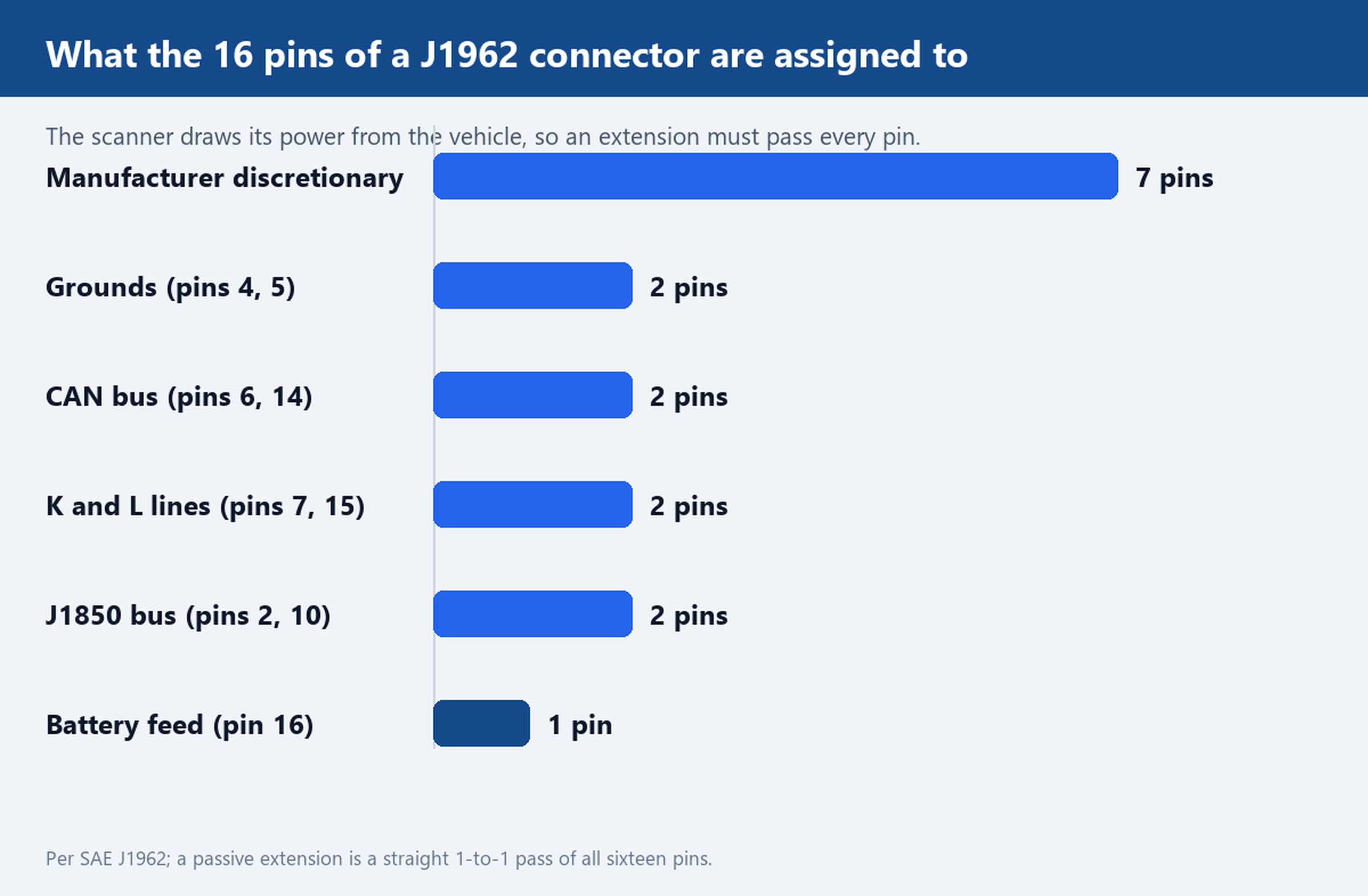
The J1962 connector carries more than diagnostics traffic. Pin 16 is a battery feed taken from the vehicle, pins 4 and 5 are chassis and signal grounds, pins 6 and 14 carry the CAN bus that most modern vehicles use for diagnostics, pins 7 and 15 carry the older K and L lines, pins 2 and 10 carry the J1850 bus on some vehicles, and the remaining seven pins are left to manufacturer discretion. An extension must pass all of them one to one, not just the data pair, because the scanner draws its operating power from the vehicle through that battery pin. A cable that is sloppy on the supply pins will fail in ways that look like tool faults, and the returns land on you.
This is also why continuity on every pin, not just the CAN pair, is the acceptance test we recommend for bulk lots. Our J1962 pinout reference lists the assignment in detail, and it doubles as a receiving checklist your QC team can hold.
Where Voltage Drop Shows Up First
Voltage drop scales with length, current and wire gauge, and it shows up in a predictable order. The first symptom is usually a tool that boots, connects, then browns out when the scanner starts polling heavily. The second is communication that works on one vehicle and resets on another, because older batteries and colder mornings shrink the margin the run already consumed. Both symptoms get blamed on the scanner, which is why the check belongs at receiving time with a multimeter.
Measure between pin 16 and ground at the tool end while the scanner is actively polling, and compare the reading with the same measurement taken at the vehicle port. The difference is the drop across your extension, grounds included. On a run inside the 5 m envelope with the correct gauge, that difference stays small enough that the tool never notices; when it grows, the run is telling you it needs a shorter route, heavier gauge, or a powered design.
Splitter or Extension: Which One Buys You the Length
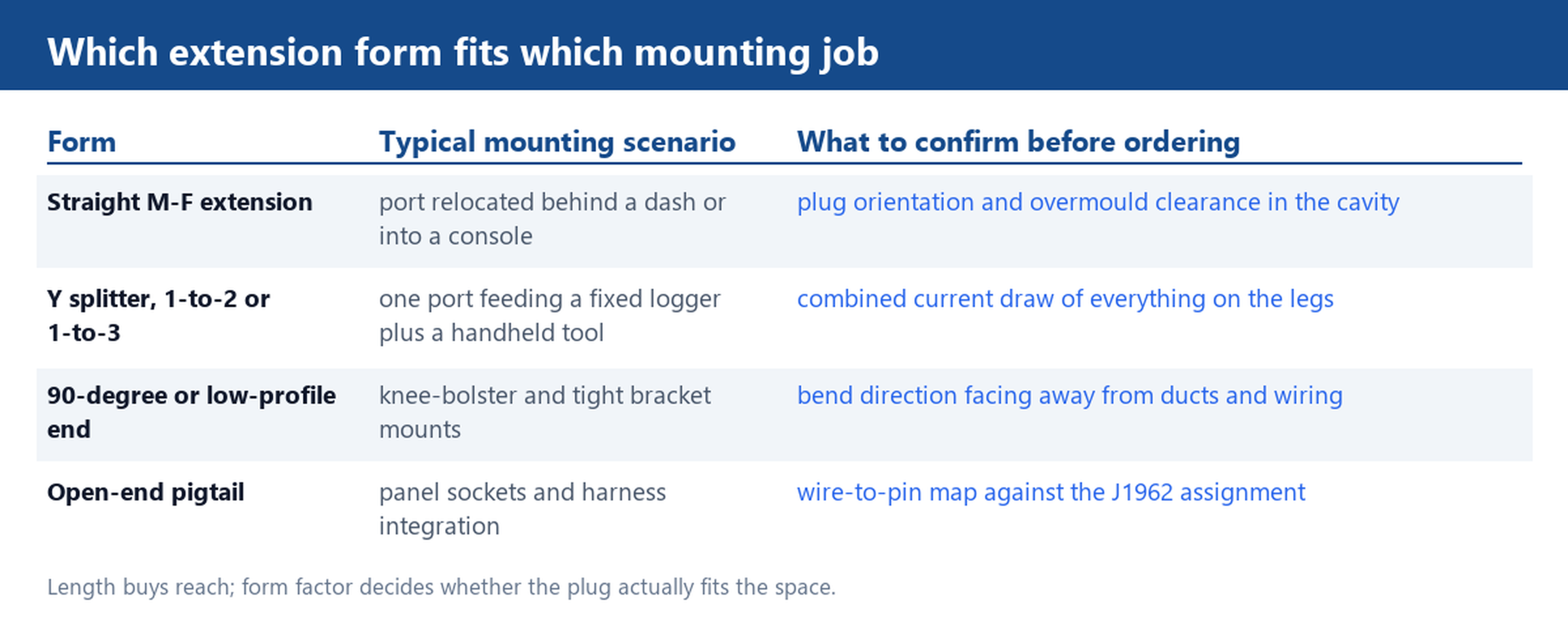
A splitter answers a different question from an extension. An OBD2 extension cable moves the port closer to where you work; a splitter such as the OBD2 1-to-3 Splitter, 16-Pin Male to 3 Female lets one vehicle port feed a fixed logging device and a handheld tool at the same time. What a splitter does not do is add drive strength. Every leg shares the same battery feed and the same grounds, so the combined current draw of everything plugged in has to stay within what the vehicle port tolerates. When the goal is length, buy an extension; when the goal is two devices on one port, buy a splitter from our OBD2 Y splitter range and budget the current across the legs.
Mounting: Low-Profile and 90-Degree Ends
Mounting decides the connector as much as the electricals decide the cable. Behind a knee bolster, a straight overmould often collides with ducting or the bracket itself, which is why we build low-profile and right-angle ends for dash work: the bend points away from the obstruction and the overmould hides behind the panel. Panel-mounted sockets and harness integration are a different job again, and for those an open end cable terminates to your own wiring instead of fighting for space.
Whatever the mounting looks like, send us the module location and the run you need; we will quote the 16-pin extension or Y-splitter length and ship a sample for a bench check. Start from the custom cable page for non-standard builds, or browse the full range in the OBD2 cables category. Samples and drawings move fastest when the request includes the vehicle type, the tool model and the exact route the cable will take.