
How to Test a USB Cable Before It Fails: 5-Minute Checks Anyone Can Run
A failing USB cable usually looks like a failing device. The phone charges but will not sync, the drive disconnects during a large file, the port works with one cable and not another. Before replacing hardware, five minutes with a multimeter, a USB meter and two known-good devices will tell you whether the cable is at fault, and roughly which part of it.
None of the checks below need a lab. This is how to test USB cable assemblies and separates with a meter, two known-good devices, and a written record of what passed.
Signs a cable is failing mid-transfer
A healthy cable fails in patterns, and the pattern usually names the wire. These five symptoms cover most of the cases that reach a support desk:
- Works in one orientation only. On a Type-C cable, flipping the plug should change nothing. If one side works, a data pair or a configuration channel line is broken.
- Charges but never syncs. A charge-only build, or a data pair that has failed open. Both look identical from the outside.
- Speed drops after a few minutes. Rising resistance at a damaged contact heats the connector, and the link falls back or drops.
- Disconnects when the cable is moved. A conductor broken inside the jacket near the moulded end.
- Slow-charge warnings. The device is reading a configuration channel or e-marker value it does not accept.
Check 1: pin-by-pin continuity with a multimeter
Unplug everything. Set the meter to continuity or low resistance and probe pin to pin at the two plugs, using fine probes so you are not shorting adjacent contacts.
For a USB-A to Type-C assembly, test VBUS, GND, D+, D-, CC1, CC2 and the shell. For a Type-C to Type-C assembly, test both CC pins and confirm the two orientations give the same result — that check alone catches the most common Type-C defect. For a SuperSpeed assembly, add the TX and RX pairs, because those can be open while the USB 2.0 pairs still work.
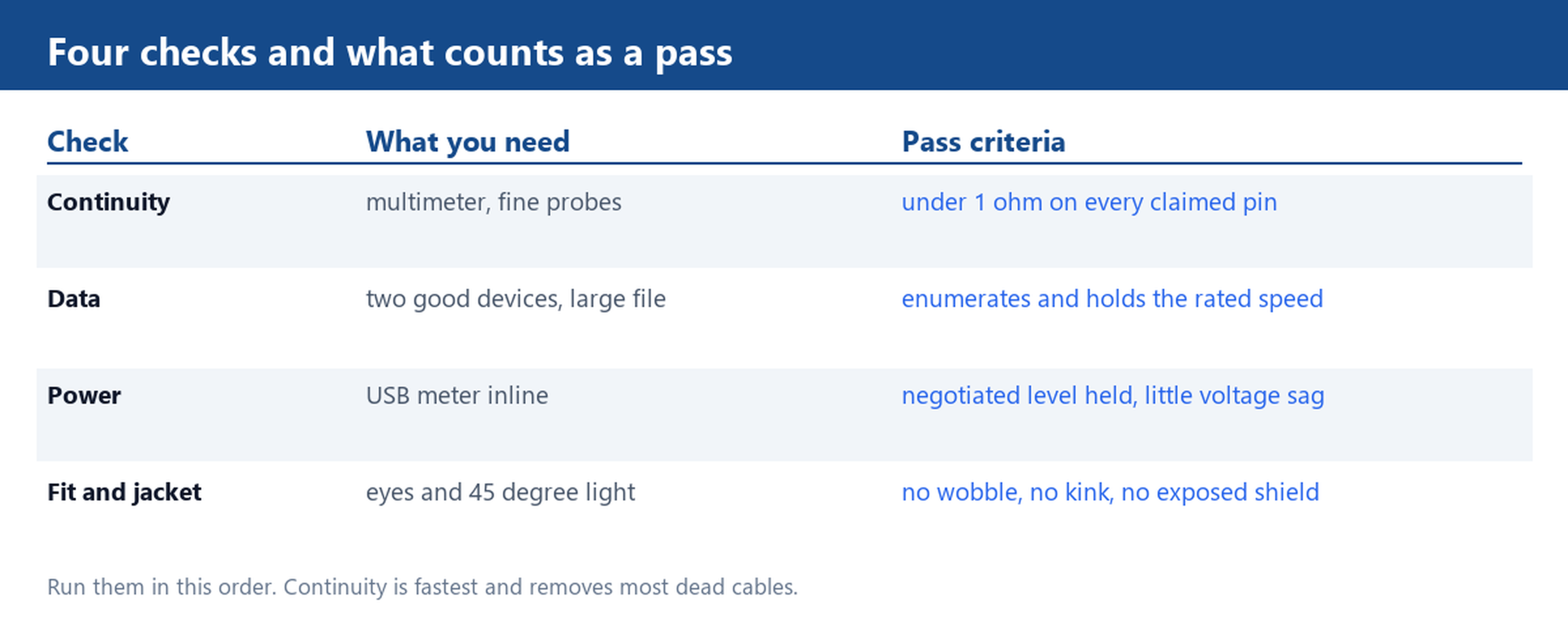
Pass criteria are simple. Every pin the cable claims should read under one ohm end to end. A pin that reads open, or drifts while the cable is flexed, has failed. Continuity between VBUS and GND means a short: stop testing and discard the cable, because the next device you plug in pays for it.
Check 2: prove it is a data cable, not a charge-only build
Two known-good devices and one large file settle this. Connect them through the cable under test, transfer a file big enough to take more than a few seconds, and watch the reported link speed. A cable that carries power and nothing else will not enumerate storage at all.
If it does enumerate, compare the negotiated speed to what the cable is supposed to support. USB 2.0 tops out at 480 Mbps, USB 3.0 at 5 Gbps and USB 3.1 at 10 Gbps, and the link always runs at the lowest rate of the three participants: cable, host and device. A SuperSpeed cable on a USB 2.0 port will show 480 Mbps and is not faulty. A SuperSpeed cable on a SuperSpeed port that still shows 480 Mbps has an open pair, and the continuity check will usually name it.
Charge-only cables exist on purpose: many USB-A to Type-C assemblies ship with only power and ground. If the order needed data, that is a specification failure rather than a defect.
Check 3: measure the power path with a USB meter
Power faults are invisible to a continuity test because the wire is intact, just too thin. A USB meter inline between charger and device shows the negotiated voltage and the current actually flowing, and the difference between the two ends of the cable shows the loss.
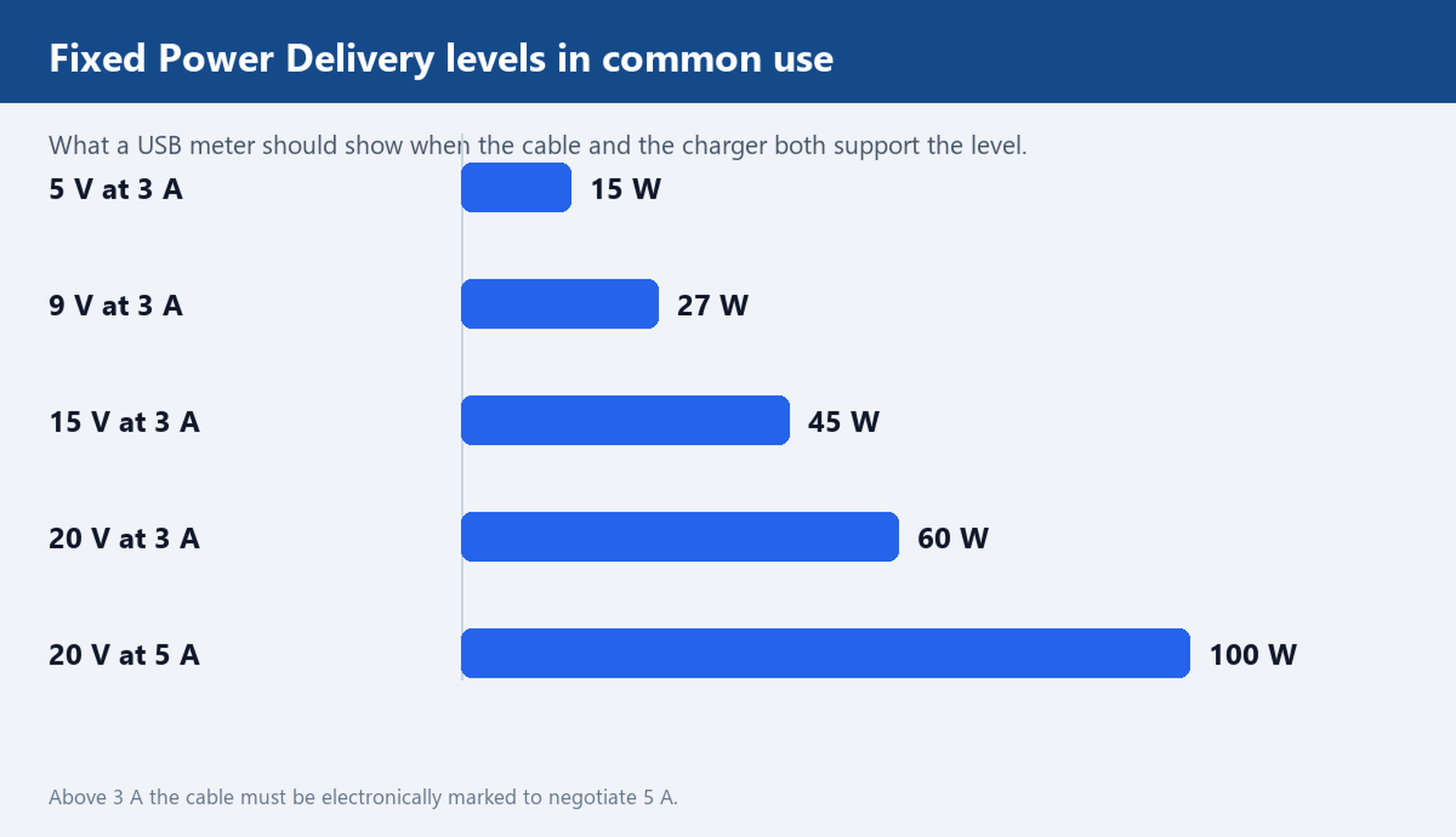
Read the result against the delivery level the cable claims. The fixed Power Delivery levels in common use are 15 W at 5 V and 3 A, 27 W at 9 V and 3 A, 45 W at 15 V and 3 A, 60 W at 20 V and 3 A, and 100 W at 20 V and 5 A. Anything above 3 A requires an electronically marked cable, so a 5 A charger that only negotiates 60 W is telling you the cable did not identify itself. Voltage sag is the other signal: a cable dropping several hundred millivolts at 3 A is losing power in the copper.
Check 4: connector fit, port wear and jacket damage
Look before you measure, because some faults are visible. Inspect the plug under bright light at an angle:
- Play. A plug that rocks in the port has worn retention features on one side, and the contacts wear faster than they should.
- Debris. Compacted lint in a Type-C or Lightning port prevents full insertion and mimics a dead cable. Clean the port before blaming the cable.
- Moulded ends. Cracks, whitening or a visible gap at the boot mean the strain relief has failed.
- Jacket. Exposed shield, a permanent kink, or discolouration near the plug are end-of-life signs.
Then flex the cable gently at both ends while watching a transfer or a charge reading. A reading that flickers under flex confirms an internal break.
When to replace the cable instead of troubleshooting the device
Replace rather than investigate further when any of these is true: continuity fails on a pin the cable claims, VBUS and GND read as a short, the plug will not hold without wobble, the jacket shows a kink or a discoloured end, or speed and power both fall short of the rating on known-good hardware. Each is a cable fault, not an intermittent mystery.
For incoming batches, turn the same four checks into a bench routine. Keep one reference cable that is known good and never leaves the bench. Pull a sample from each carton, run continuity first because it is fastest, then a data transfer, then a meter reading under load, then a visual pass. Log the SKU, the carton and the result for every failure, and quarantine them instead of returning them to stock. A log with a carton number in it is what turns a complaint into a supplier conversation.
The cheapest way to avoid this routine is to test before the order: sample the USB cable you intend to buy and run the same four checks against your own devices. Our USB Type-C range includes assemblies such as the USB-C to USB-C 60 W cable built to be checked this way, and the USB 2.0 category covers the charge-and-sync builds. Tell us the devices and the current you need and we will point you at the right construction.

Leave a Reply