USB-C E-Marker: Why a 5A Cable Needs the Chip and a 60 W Cable May Not
If you order a USB-C cable rated for 5 A, the cable must carry an e-marker chip inside one of the plugs. That chip is what tells the charger the cable is allowed to pull 5 A and reach 100 W; without it, any Type-C source caps the current at 3 A no matter how thick the copper is. A cable built for 60 W, which is 3 A at 20 V, can be perfectly correct without a chip. The buying risk is not the chip itself but the gap between sample and bulk lot: the sample carries the chip, the production run ships without it, and every end user notices slow charging within a week. This article sets out where the chip requirement sits, why the copper alone decides nothing, and the checks that keep a bulk order honest.
What the e-marker chip does
A USB-C e-marker is a small integrated circuit embedded in one plug mould and connected to the CC line. Every Type-C to Type-C cable already carries passive resistors on that line, which announce that a functioning cable is present. The marker is extra silicon that answers questions. When a charger and a device connect, the source talks to the cable over the CC wire and asks what the cable can carry. A marked cable replies with its rated current and its supported voltage ranges. An unmarked cable replies with nothing, and the source assumes the safe default of 3 A. The negotiation then stops there, regardless of the conductor size inside the jacket.
The marker stores plain electrical facts: the maximum current the cable is rated for, whether it supports the higher voltage ranges used above 100 W, and in many builds the cable length. It holds no firmware and cannot be updated from the charger side. That is why the chip question has to be settled at the factory, not at the support desk.
Where the line sits: 5 A cables carry the chip, 60 W builds often do not
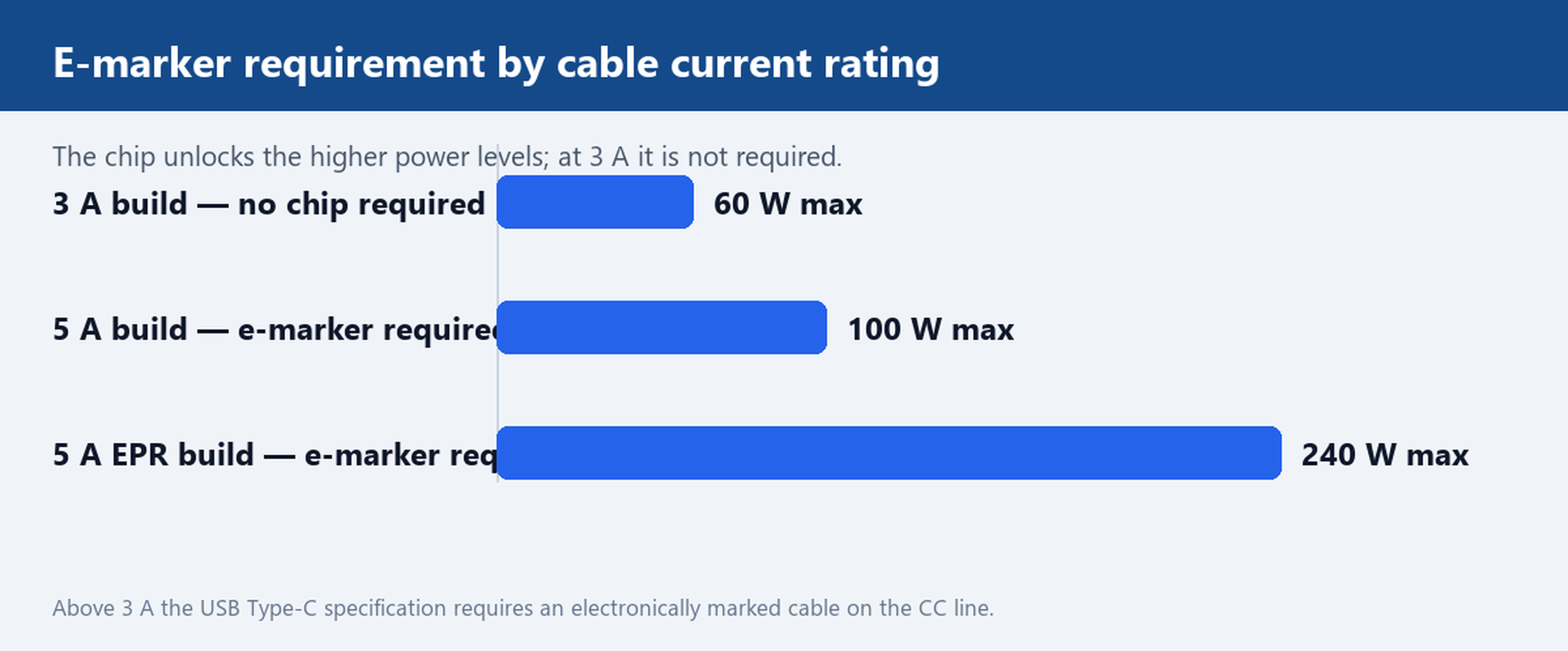
The rule in the USB Type-C specification is short: a cable that carries more than 3 A must be electronically marked. Below 3 A the marker is optional, and most factories skip it because a chip adds cost with no benefit at 60 W. Two builds from the USB Type-C Cables range show the split. The USB-C to USB-C 60 W Cable, Gold Plated, 3 m is built for 20 V at 3 A, so it ships without a marker on purpose. The 5A USB-C to USB-A SuperCharge Cable, Braided is built for 5 A-class current on the power conductors; on a Type-C to Type-C link that rating is only unlocked by a marked cable, while on a USB-A charger the current flows under the older default rules and the wire gauge does the work.
In practice, buyers should treat the marker as a rating question, not a quality question. A 60 W cable without a chip is correct engineering. A 100 W cable without a chip is not a 100 W cable at all; it is a 60 W cable with thicker copper and a print that promises more than the negotiation can deliver.
Why a missing chip caps charging even when the copper is thick enough
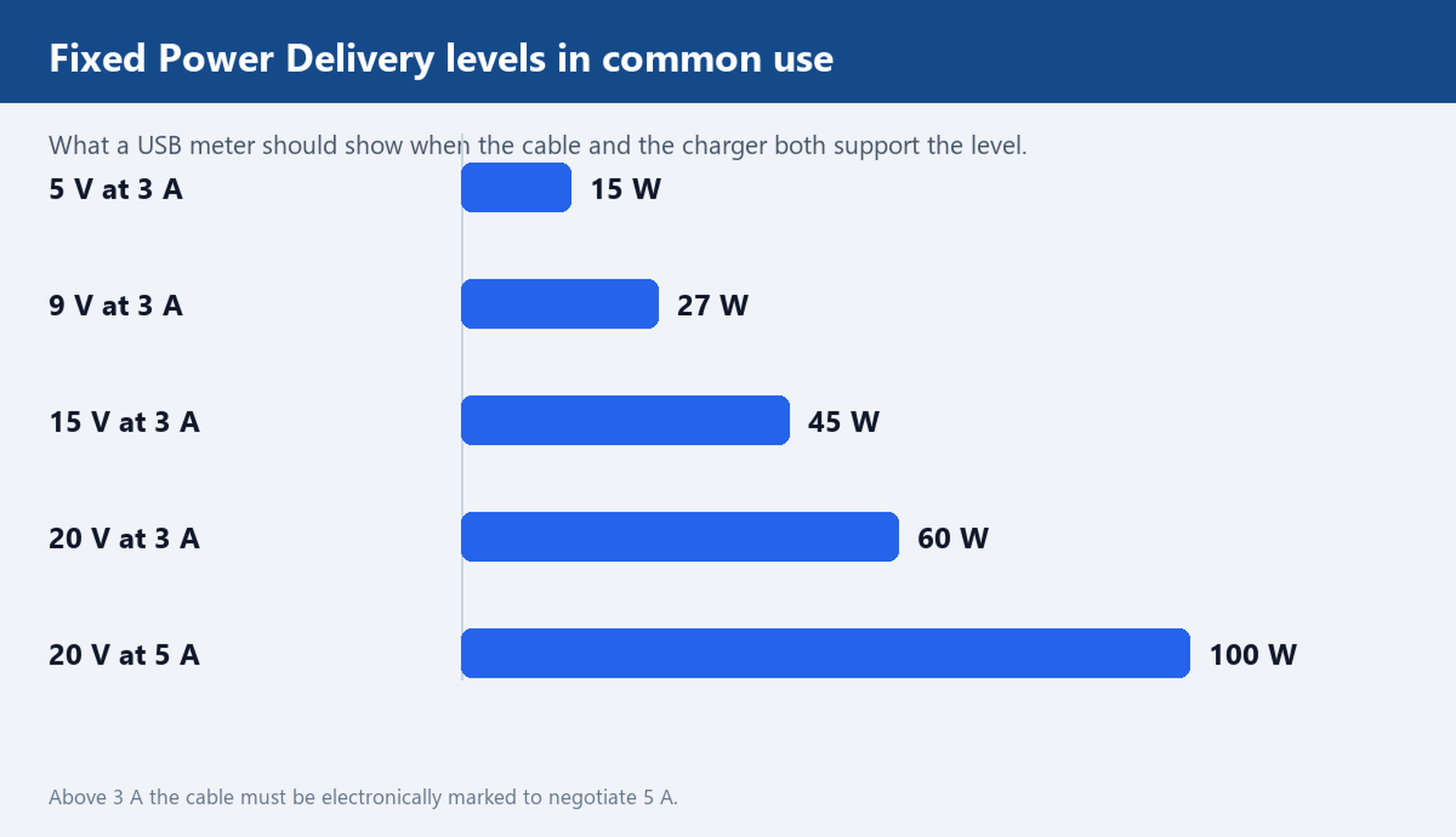
The failure mode is quiet. The cable works, the laptop charges, nothing overheats. But a 100 W laptop on a 20 V charger pulls only 3 A, so it charges at 60 W, roughly half the rate the buyer paid for. Phone charging slows down the same way. Because the cap comes from the negotiation table, swapping the charger does not fix it and no device firmware update fixes it either. A practical fix is a cable whose marker reports 5 A; everything else leaves the cap in place.
This is also why the fault clusters in bulk lots rather than in samples. The factory ran the sample line with marked plugs and the mass production line with cheaper unmarked ones, or the plug supplier changed between runs. The copper did not change, the print on the jacket did not change, and the shortfall only shows up when a user plugs into a high-power charger.
How to check a sample before the bulk order
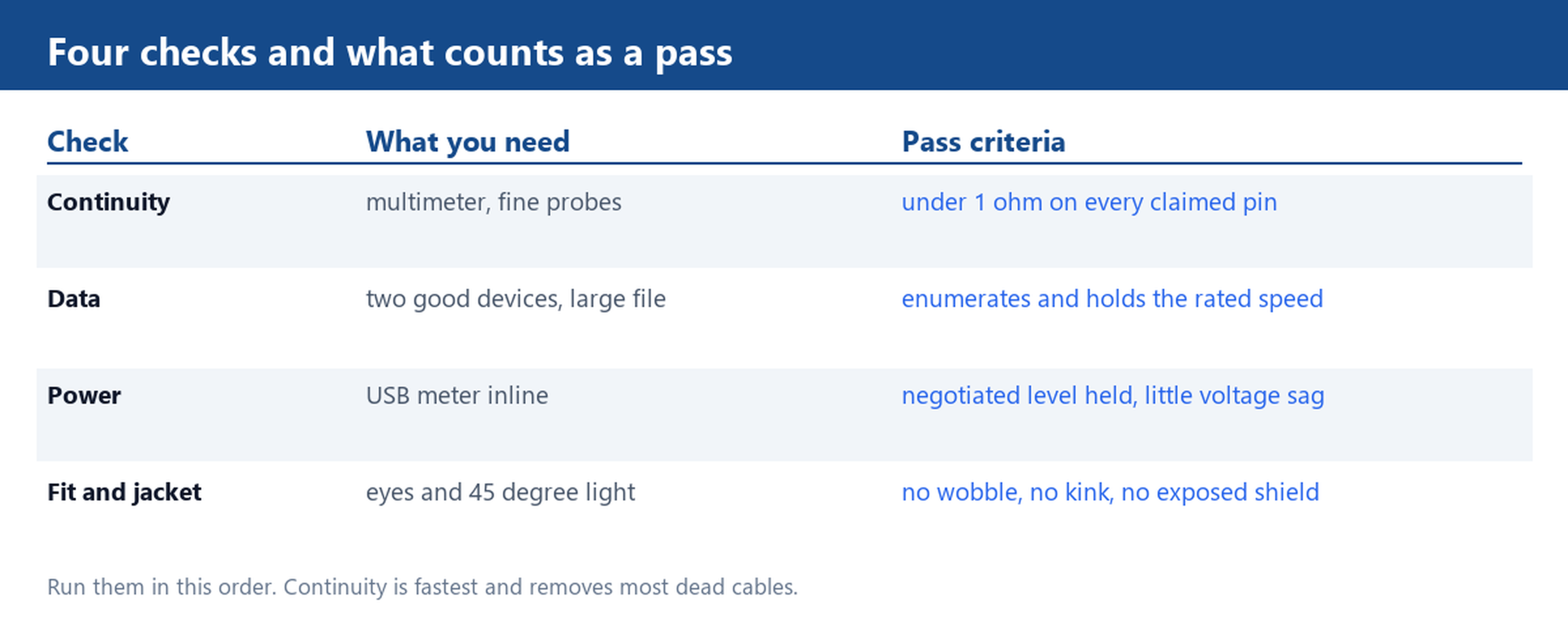
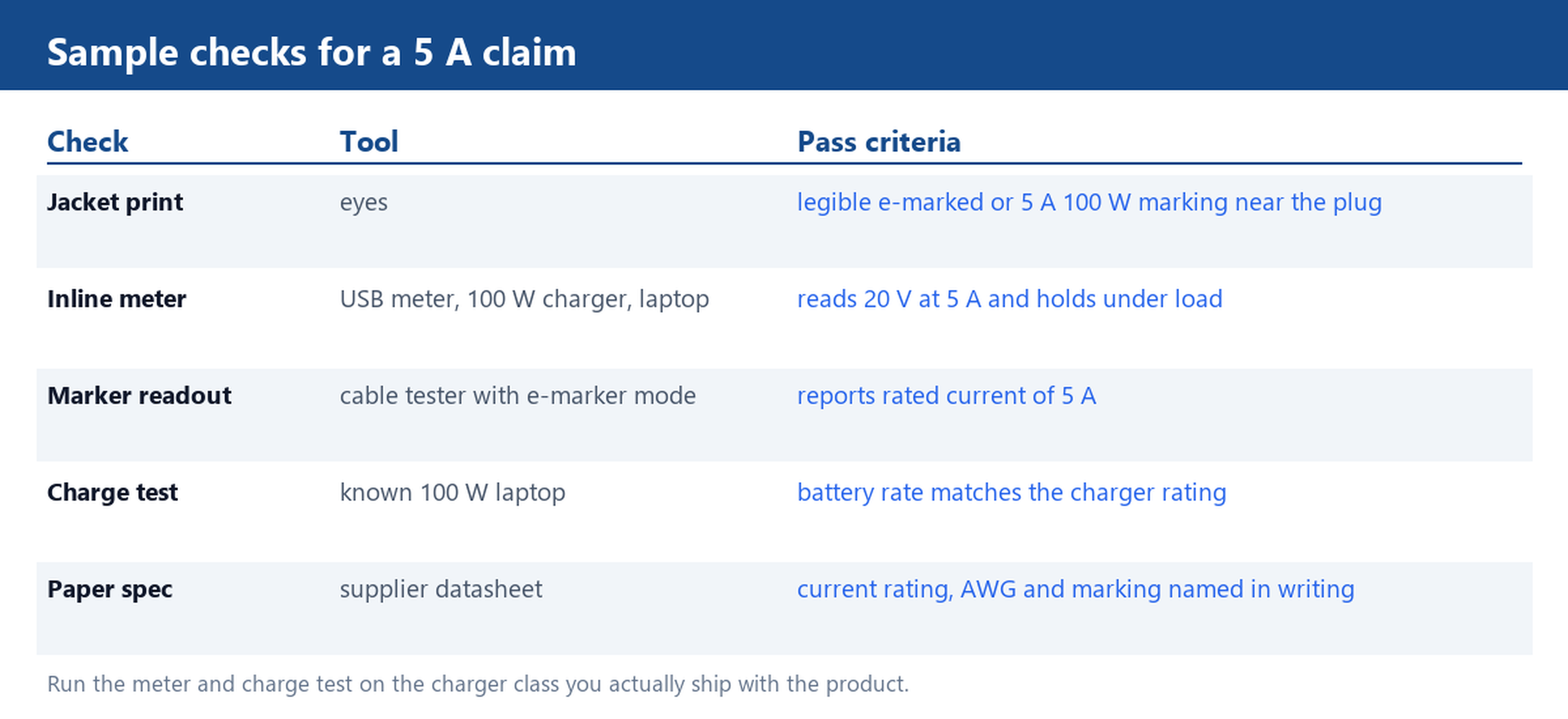
Four checks, in order of cost:
- Jacket and plug print. A marked cable usually carries an e-marked or 5 A print near the plug mould. Absence of print is not proof that the chip is missing, but a clear print at least tells you the factory tracked the rating.
- Inline USB meter. Put a meter between a 100 W charger and a laptop that accepts 100 W. A marked 5 A cable negotiates 20 V at 5 A. An unmarked one sits at 20 V 3 A. Record both numbers.
- Tester readout. Bench testers with an e-marker mode read the chip directly and display the rated current. This is the fastest check on a large sample table.
- Charge test on a known device. Charge the same 100 W-class laptop on the original cable and on the sample, then compare the charge rate the operating system reports.
Run the meter and charge test on the charger class you actually sell into, not on whatever is on the bench. The Charger Cables category shows the pairings buyers ask for most, and the same logic applies: the test has to match the end use.
Specifying the rating in your PO
Wording decides whether a claim is enforceable. Ask for three lines in writing:
- Electronically marked cable, rated 5 A at 20 V (100 W), stated on the datasheet and on the test report.
- Power conductor gauge named explicitly, typically 20 to 21 AWG on 5 A builds and 22 to 24 AWG on 3 A builds, with longer runs at the thicker end of the range to hold voltage.
- Marker readout recorded per production batch, not per sample only.
Where the cable is custom in length, colour, jacket or plug moulding, the same three lines belong in the custom spec sheet before tooling starts. The Customize Cable page shows what a spec sheet should carry, the Factory page covers line-side inspection, and How to order walks through the sampling and confirmation steps in sequence. For the full catalogue by family, start at the USB Cables category.
Ask for a 5A e-marked sample plus a written current rating before you place the bulk order, and keep the meter reading from that sample taped to the PO. The two together turn a slow-charge complaint from a warranty argument into a five-minute replacement conversation.