

A USB to RS-232 cable for industrial control is the small link that lets a modern laptop keep talking to an older instrument, electronic scale, PLC or barcode gun. The real question is rarely whether a serial port can be emulated at all. It is which adapter build survives daily bench use, what the DB9 pins actually carry, and whether the device at the far end speaks RS-232 rather than RS-485 or TTL. This guide sets out the checkpoints that matter before you place an order, using the molded FTDI converter cable and the FT232RL bare-wire lead as the two reference builds.
What a DB9 Port Still Does on a Control Bench
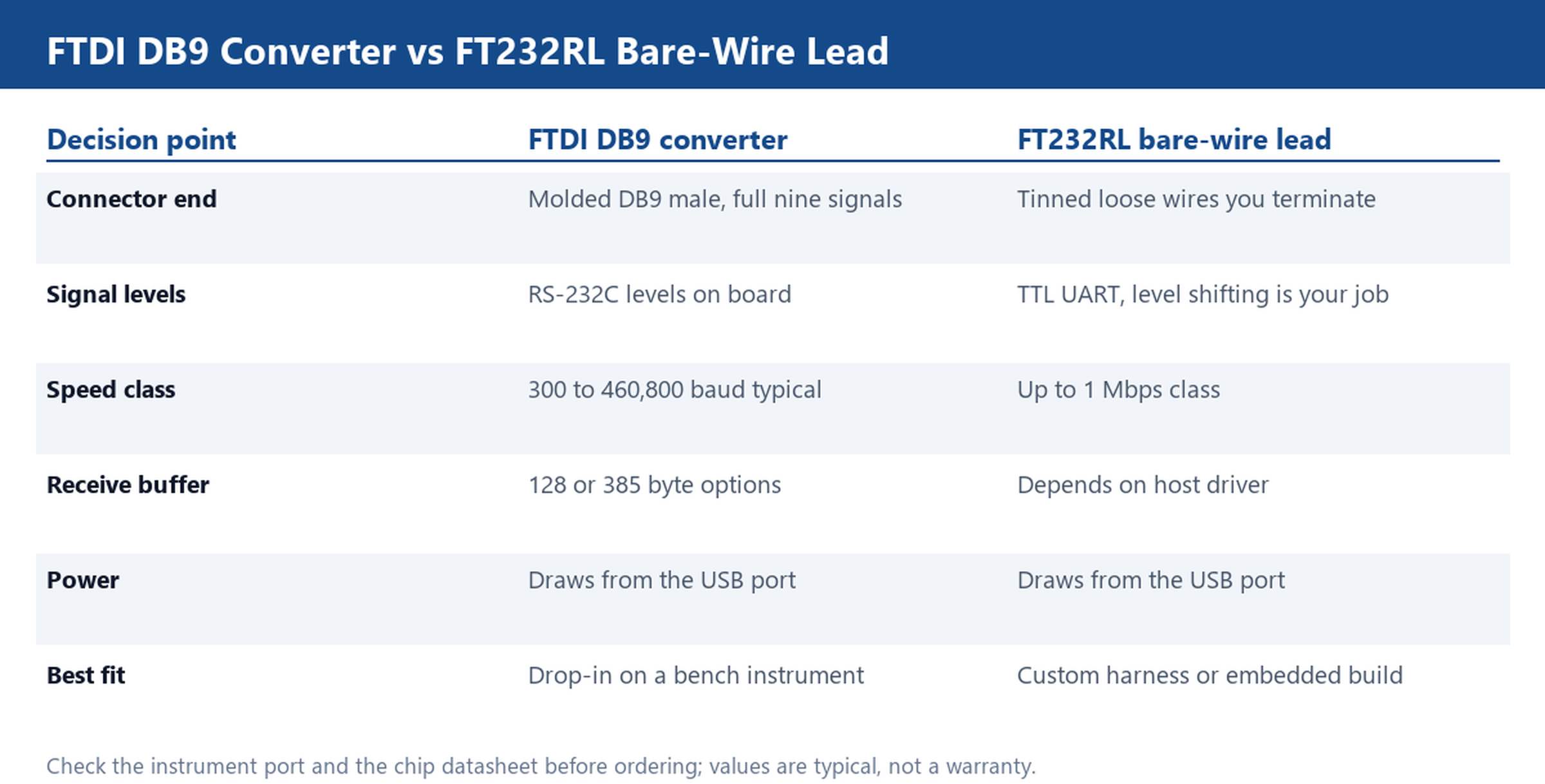
A nine-pin DB9 connector looks like a relic, yet it remains the physical language of a remarkable amount of lab and factory gear. A scale, a programmable logic controller, a barcode gun and a bench meter may all expose the same DE-9 socket, but they use very different subsets of its nine circuits. A full RS-232C implementation assigns transmit data, receive data, request to send, clear to send, data terminal ready, data set ready, data carrier detect, ring indicator and signal ground. Many instruments only ever drive transmit, receive and ground, and expect the host to leave the handshaking lines alone. That difference is the first thing a converter must handle. An adapter that wire-ORs the handshake pins incorrectly will appear to work during a short test and then stall during a long log, because the instrument is waiting for a clear-to-send transition that never arrives. When you specify a usb to rs232 cable for industrial control, ask whether all nine signals are brought out or only the three-wire minimum, and confirm this against the wiring note for the exact instrument. A converter cable with a molded DB9 shell normally terminates every circuit and labels the pinout; that is what makes it a drop-in replacement on a bench. A bare chip solution leaves the termination to you.
FTDI Converter or FT232RL Bare-Wire Lead
The two common ways to bridge USB to a serial port lead to very different purchasing decisions. A finished FTDI converter cable integrates the bridge chip, the level shifters, a molded DB9 connector and a short fixed length of cable into one part. Plug it in, load the driver, pick the COM port and you are communicating. It is the right choice when the instrument already has a DB9 socket and you want to swap the lead without touching wiring. A FT232RL bare-wire lead ends in tinned loose wires instead of a connector. The bridge chip is present, but the RS-232 voltage levels and the connector are your responsibility. That build suits a custom harness, an embedded panel or a repair where the far-end pinout is unusual. It is a poor fit for a bench that needs to move the cable between several instruments during a shift. Gold-plated contact versions, such as the gold-plated FTDI converter, are worth considering where connectors are mated and unmated many times a day and a cleaner contact surface helps resist wear. None of these builds is universally better; each answers a different question about who terminates the signals and how often the plug is handled.
Baud Rate, Buffers and the Nine Signals That Must Be Wired
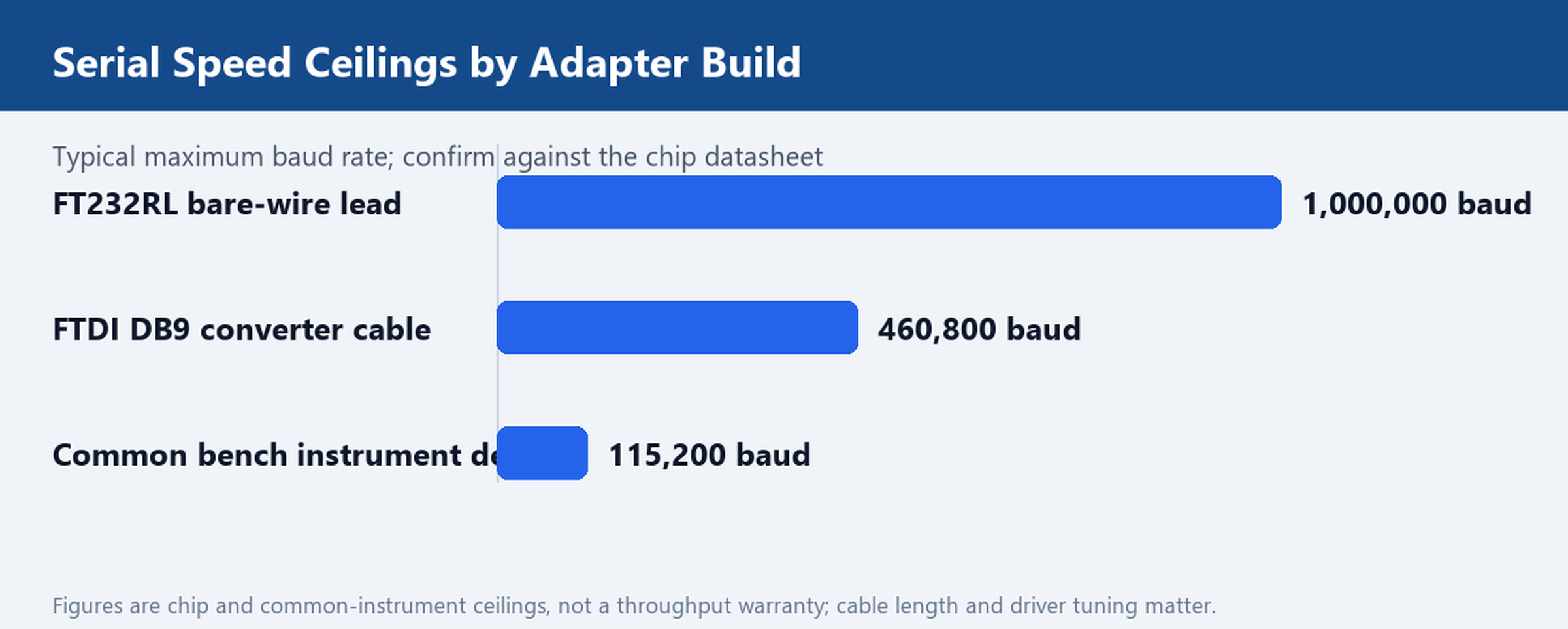
Speed is usually quoted as a single headline number, which is why it causes so much confusion. A finished FTDI converter is commonly rated across a range from about 300 baud up to 460,800 baud with a full RS-232C signal set, while an FT232RL chip on a bare-wire lead can be specified up to a 1 Mbps class in the datasheet. Those are ceilings, not guaranteed throughput on a long cable. Receive and transmit buffers are the quieter constraint: options around 128 bytes and 385 bytes exist, and a deeper buffer is what stops a burst of instrument data from being dropped while the host is busy elsewhere. The practical test is to log at the real instrument rate for an hour, not to run a short loopback. Alongside speed, decide which of the nine signals must actually be wired. Three-wire links need transmit, receive and ground only. Anything that relies on hardware flow control needs request-to-send and clear-to-send as well, and a modem-style device may watch data-set-ready or carrier-detect before it will answer. A converter that leaves a required handshake line floating will fail intermittently, which is the hardest fault to diagnose on a busy bench. Match the pinout to the device first, then choose the speed headroom.
One USB Socket, Four Serial Ports: When the 1.2 m Breakout Pays
A single-port cable is fine until the bench accumulates four instruments that all need to stay connected at once. Repeatedly unplugging one DB9 lead to log another device wastes time and wears the connector. A four-port USB to RS-232 breakout presents one USB plug to the host and four DB9 leads on a short 1.2 m fan-out, so each instrument keeps its own COM port and the logging script can address them independently. That layout pays when the devices are clustered within arm reach of the workstation and the run of each lead is short. It stops paying when the instruments are spread across a rack, because four fixed 1.2 m tails cannot be routed independently and extending them with ordinary serial cable can erode the signal margin. Another trap is driver behavior: a four-port adapter normally enumerates as several consecutive COM numbers, and those numbers can shift after a reboot or when another USB device is added. Bind each port in software to the instrument it serves rather than assuming a fixed COM assignment. For a bench that is rebuilt often, the convenience of one USB socket is worth the extra attention to port mapping. For a single instrument on a permanent desk, the simpler single-port lead remains easier to support.
Check the Device First: RS-232 Is Not RS-485 or TTL
The most expensive mistake in this category is buying the right connector for the wrong electrical standard. A DB9 socket on an instrument does not by itself mean RS-232. RS-485 also appears on DB9 hardware, uses differential pairs instead of a single-ended signal referenced to ground, and is built for multi-drop runs over long cable. TTL serial is a third case: it uses logic-level voltages, usually 3.3 V or 5 V, and cannot be tied directly to RS-232 lines without level conversion. Plug a TTL-only board into a true RS-232 converter and the voltage swing can damage the input; plug an RS-232 adapter into an RS-485 bus and neither side will communicate reliably. Before ordering, read the device port label or manual and identify the standard, the voltage levels and whether the port is master or slave. If the manual only shows a pin table, compare it with a known RS-232 pinout and check for the +/- voltage swings that characterize the standard. This one check eliminates most returns in the serial adapter category and is why an experienced buyer treats the instrument documentation as part of the bill of materials rather than an afterthought.
Ordering Lines: Length, Plating and the Compliance File
Once the electrical standard and the signal set are settled, the remaining choices are mechanical and documentary. Fixed lengths such as 0.35 m suit a laptop sitting directly beside the instrument; a 1.8 m lead gives enough slack to route around a bench without tension on the DB9 shell; the 1.2 m four-port fan-out covers a cluster of devices. Do not assume a longer cable is automatically better, because a longer single-ended run is more exposed to electrical noise from nearby motors and supplies. Connector plating matters in high-mate environments, and the molded strain relief matters anywhere the cable is pulled by accident. On the documentary side, ask for the driver package and the compliance file before you specify a part. A converter that relies on an unsigned or abandoned driver can turn a one-line purchase into a fleet-wide support problem, and a repeatable order needs the same chip revision in every batch. We can supply the cable in the length, plating and port count your bench requires, and can note the exact chipset on the quotation so subsequent batches stay consistent. Driver and software downloads are available for the standard builds, and a custom cable request covers special pinouts or lengths; browse the wider USB cables range for related parts. Send the instrument model and port count you need to support and we will quote a sample converter in the 1.8 m and 4-port versions.