

A vga to hdmi cable for legacy projector duty is not a passive lead with two different plugs on the ends. VGA moves an analog red, green and blue signal; HDMI carries a digital stream. The conversion has to happen inside an active chip, that chip needs a 5 V supply from a USB tail, and sound has to be added through a separate 3.5 mm lead. Get those three facts right and a meeting room with an older laptop and a modern HDMI display can still show a clean 1080p at 60 Hz picture.
One Direction: VGA In, HDMI Out
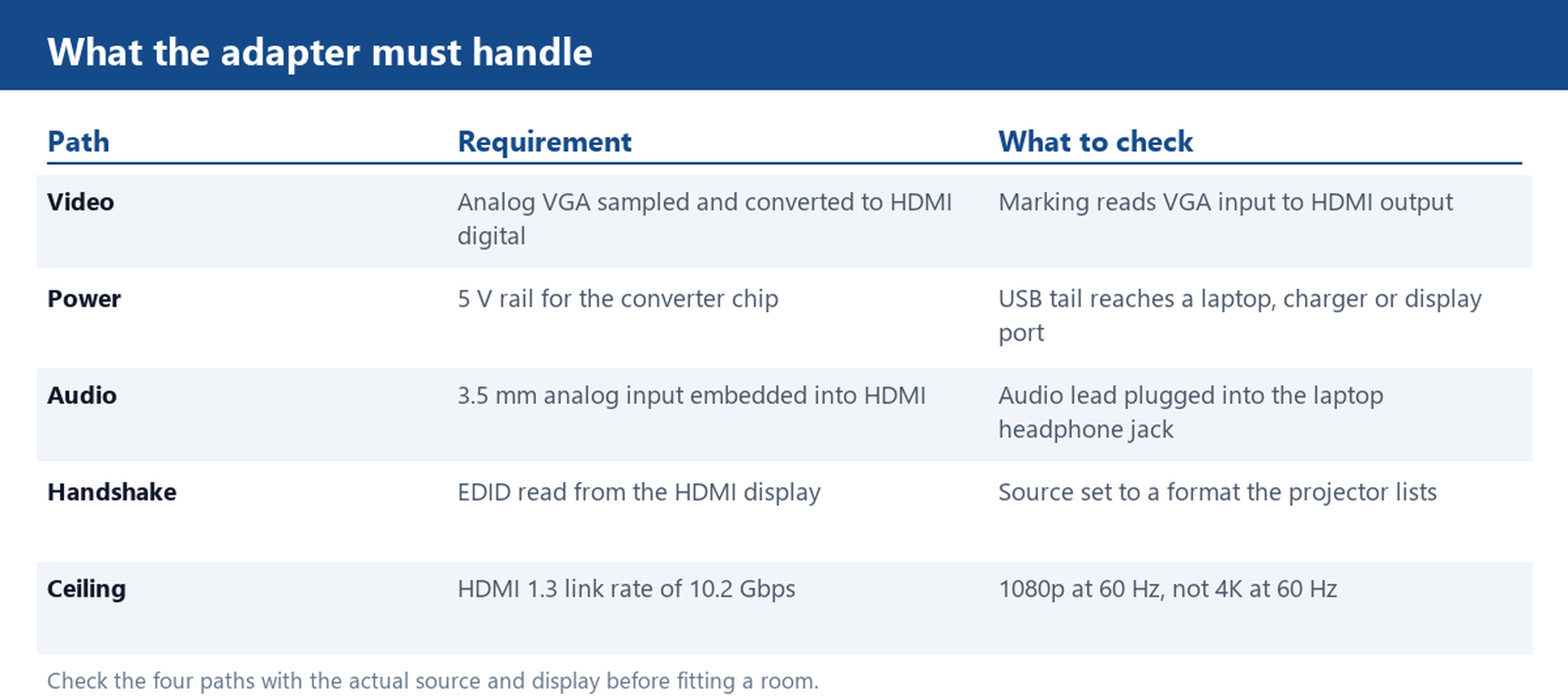
Active converters are directional. The chip samples the three analog video channels and the sync lines on the DE-15 side, then serializes the result into the HDMI stream. Doing the reverse would require decoding HDMI and driving digital to analog converters, which is a different product with a different label. A lead marked VGA male to HDMI male is therefore meant for a VGA source and an HDMI display. Read the moulded text on both ends before ordering, because the two shells can look similar in a dim store room.
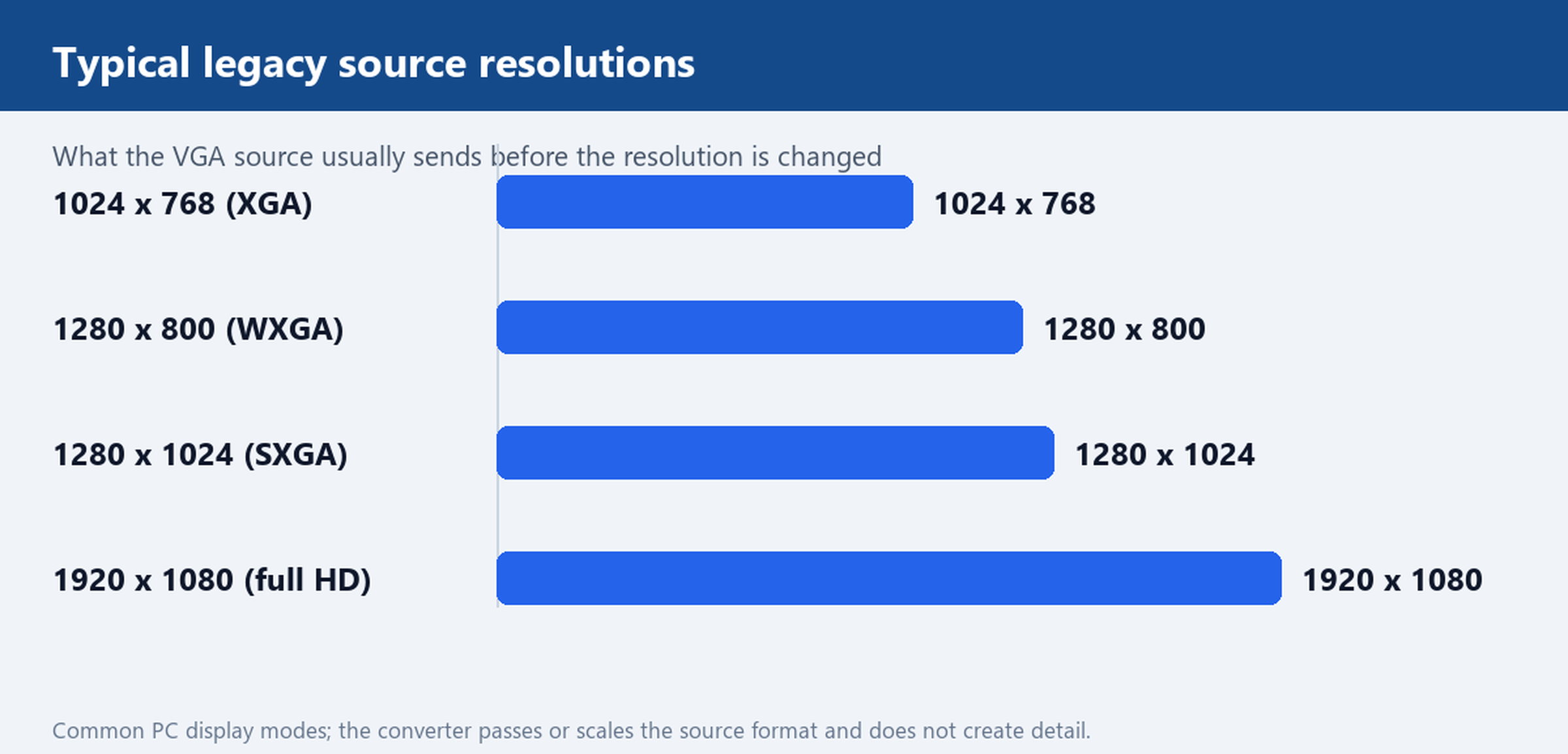
The converter also performs a handshake. It reads EDID data from the HDMI display and reports a format the VGA source can actually produce. That is why a projector advertising 1920 x 1080 at 60 Hz in its brochure can still come up at 1024 x 768 when a legacy laptop is attached: the source picks an older default and the display follows it. Set the resolution deliberately in the operating system before blaming the cable. If the source is a docking station with several external ports, confirm which port is live, and keep the analog run short so the signal reaches the converter cleanly.
Why the Adapter Needs a 5V USB Tail
A DE-15 VGA port was designed to carry analog voltage for three colour channels plus horizontal and vertical sync. It was not designed to feed an analog to digital converter, an HDMI transmitter and an EDID buffer. Pin 9 on some implementations carries a small 5 V current, but it is not a dependable rail for that work. The adapter therefore grows a second tail ending in a USB A plug. The USB end goes into a laptop port, a wall charger, or the service port on the display, and it supplies the rail the chip needs before any video is processed.
When the tail is unplugged, the symptoms are easy to misread. The HDMI indicator may light while the screen stays black, or a picture can appear for a second and then drop as the chip resets. For a shared room, treat the power source as part of the installation rather than an accessory: a wall charger keeps working when the laptop is unplugged and moved to another table. Check the USB tail length too. A short tail that barely reaches a socket leaves the VGA plug under strain, and a strained plug is the usual cause of a flickering image. For a fixed podium install where nobody wants a loose plug behind the projector, a converter box with its own supply is easier to service than a cable tail buried in the rack.
Audio Never Travels on VGA: The 3.5 mm Input
VGA was a video interface with no audio pair, so any adapter that promises sound needs a second input. In this class the second input is a 3.5 mm TRS lead running from the headphone jack of the laptop into the adapter housing. Inside the housing that analog audio is embedded into the HDMI stream next to the converted video. If the lead is left on the desk, the projector will show the slide deck and play nothing through its speakers. That is a wiring omission, not a failed converter, and it is the most common complaint we see from rooms that were fitted in a hurry.
Some older laptops use a combined jack that also accepts a microphone plug, so check the output setting before deciding the port is dead. Where the room already has a soundbar or an amplifier, feed the HDMI signal to the display and run the audio through the existing system rather than relying on the small speaker in the projector. Keep the 3.5 mm lead with the adapter when it travels in a bag: a converter that arrives without its audio lead will fail the first sound check. On a permanent install, label both tails at the patch point so the next person knows which end carries video and which end carries sound.
1080p at 60 Hz and What the HDMI 1.3 Chip Will Not Do
Most adapters in this class are built around HDMI 1.3 generation silicon. That revision supports a link rate of 10.2 Gbps, enough for 1920 x 1080 at 60 Hz with ordinary 8 bit colour. It is not a path to 4K at 60 Hz, and it will not turn a 1280 x 1024 source into a sharp 1080p image. The chip passes through or scales what the source sends; it cannot invent detail that was never in the analog signal. Analog bandwidth and cable quality set the other half of the limit, so long and poorly shielded VGA runs can soften edges before the converter sees them. Place the converter close to the source where the room layout allows it.
A 1080p marking on a box describes an output ceiling, not a guarantee for every legacy machine. Business class laptops from the VGA era often default to 1024 x 768 or 1280 x 800 on an external display, and the projector will follow that default until someone changes it. Projectors vary as well: some accept 1080p at 60 Hz on HDMI but scale it back to their native 1280 x 800 panel, which is fine for slides and less fine for fine text. Test with the actual source machine and the actual display before rolling an adapter into a whole floor of rooms.
Cable Form or Converter Box: Which One Fits the Install
Choose the cable form when the source and the display sit close together and one laptop is used in the room. It is a single item to issue, store and replace, and the power tail and audio lead stay attached to the same housing. Choose a converter box when the run is longer, when several people plug in different laptops during the day, or when the 5 V supply needs to be permanent. A box gives the connectors a firmer anchor and leaves room for a proper strain relief on the analog side. In either case, check that the USB tail reaches a real socket and that the audio lead reaches the laptop jack without pulling.
For volume orders, ask about the shell strain relief, the length of both tails and whether the 3.5 mm lead is detachable. Those details decide how the unit survives a shared room far more than the resolution printed on the packaging. We can also change tail lengths and connector shells for a specific installation, and our ordering page explains how to send the source and display models for a quote. Tell us the source machine and the display, and we will quote the cable form or the converter box with the matching 5V tail and 3.5 mm lead.