Audio Visual Cables

HDMI, VGA, DisplayPort and A/V cable guides: resolution, bandwidth and length limits for meeting rooms, signage and home theatre.

How to Test an HDMI Cable Before Accepting a Bulk Lot: Pinout, TMDS and 4K Checks

A bulk lot of HDMI cables can look perfect on arrival and still fail in the equipment rack: no picture at 4K, sparkles during motion, or a signal that drops whenever someone touches the cable. The eye test at the loading dock catches none of that. What catches it is a fixed acceptance routine: continuity against the 19-pin map, a full-link test at the resolution you actually ship for, and a purchase order that says in advance what counts as a failed lot. This article lays out how to test HDMI cable assemblies at acceptance, in the order we recommend running it, with the pass criteria for each step.

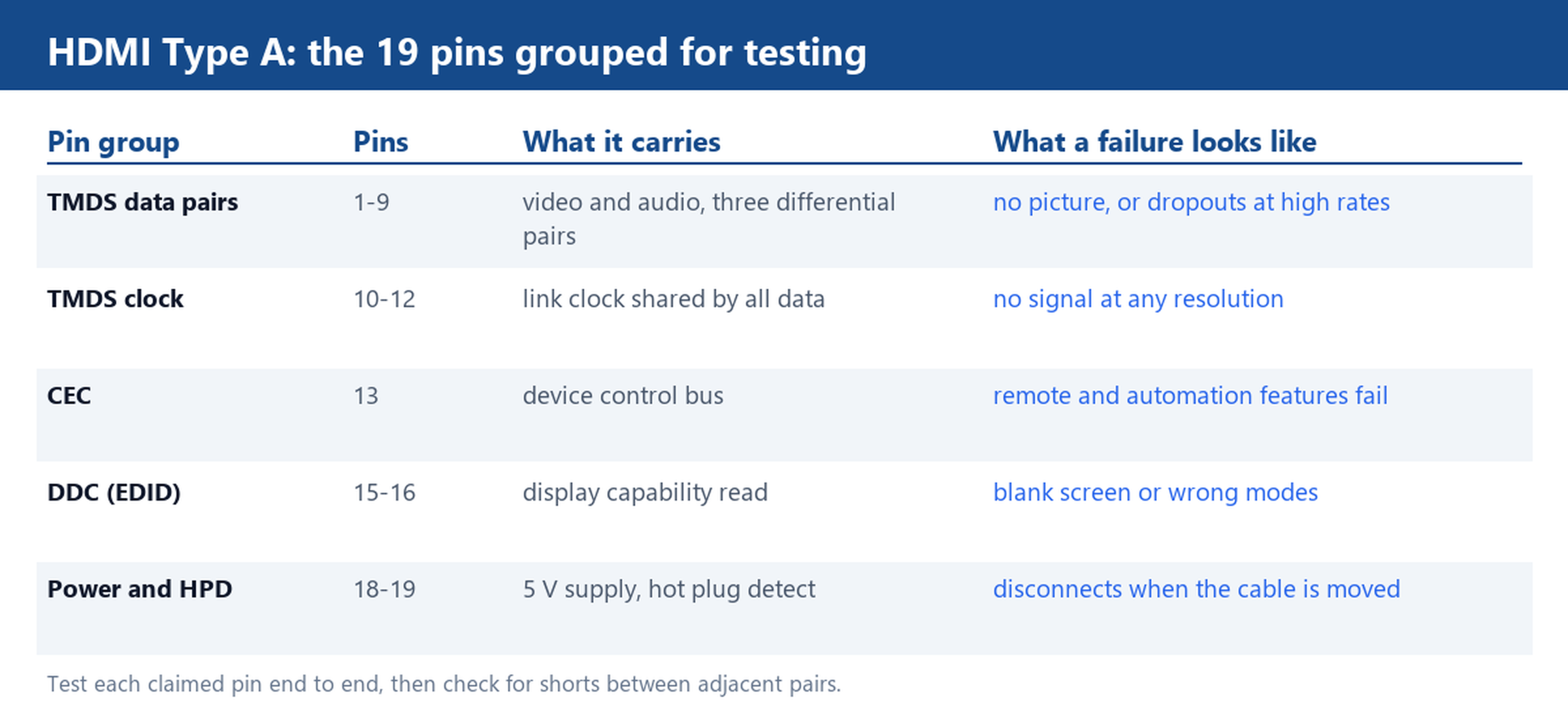
Table grouping the 19 HDMI Type A pins for testing: TMDS data pairs on pins 1 to 9, clock on 10 to 12, CEC on 13, DDC EDID lines on 15 and 16, and 5 volt supply plus hot plug detect on 18 and 19, with the failure each group causes
Each pin group has a signature failure, which makes the bench test fast to interpret.

Prefer watching? The full walkthrough is below — pinout, TMDS pairs and the 4K check, in the same order as this article.

What a cheap cable tester can tell you, and what it cannot

An inexpensive pin tester is the right first filter. Wired to two sockets, it reports continuity pin by pin and flags open circuits, shorts between adjacent conductors and crossed pins. On a lot of a few hundred cables this removes the dead units in minutes and costs almost nothing per check.

The same tester cannot certify the link. It does not drive a real TMDS signal at multi-gigabit rates, it does not measure shield coverage, and it says nothing about how the assembly behaves when the cable is flexed or the plug is wobbled. Treat it as a filter, not as an acceptance certificate. Everything after this step exists to catch what the tester cannot see.

Pin-by-pin continuity: TMDS pairs, clock, control and power

The 19 pins of an HDMI Type A plug divide into clean groups, and each group has a signature failure. The three TMDS data pairs sit on pins 1 to 9 and carry video and audio as three differential pairs; a break in any pair means no picture or heavy dropouts, and a short between adjacent pins often shows up only at high data rates. The TMDS clock pair on pins 10 to 12 carries the shared link clock; if it is open there is no signal at any resolution, which is actually a useful signature because it is easy to reproduce. Pin 13 carries CEC, the control bus behind remote and automation features. Pins 15 and 16 are the DDC lines the source uses to read EDID from the display; a broken DDC line gives a blank screen or a device that only offers wrong modes. Pin 18 supplies 5 V and pin 19 is hot plug detect; when HPD is intermittent the display disconnects exactly when the cable is moved.

Probe each claimed pin end to end with the meter in continuity mode and expect a resistance near an ohm or less, then check for shorts between adjacent pins. On a plug-moulded assembly, wiggle the cable gently at the plug while probing; a reading that flickers marks a broken conductor inside the mould, which no static test reveals.
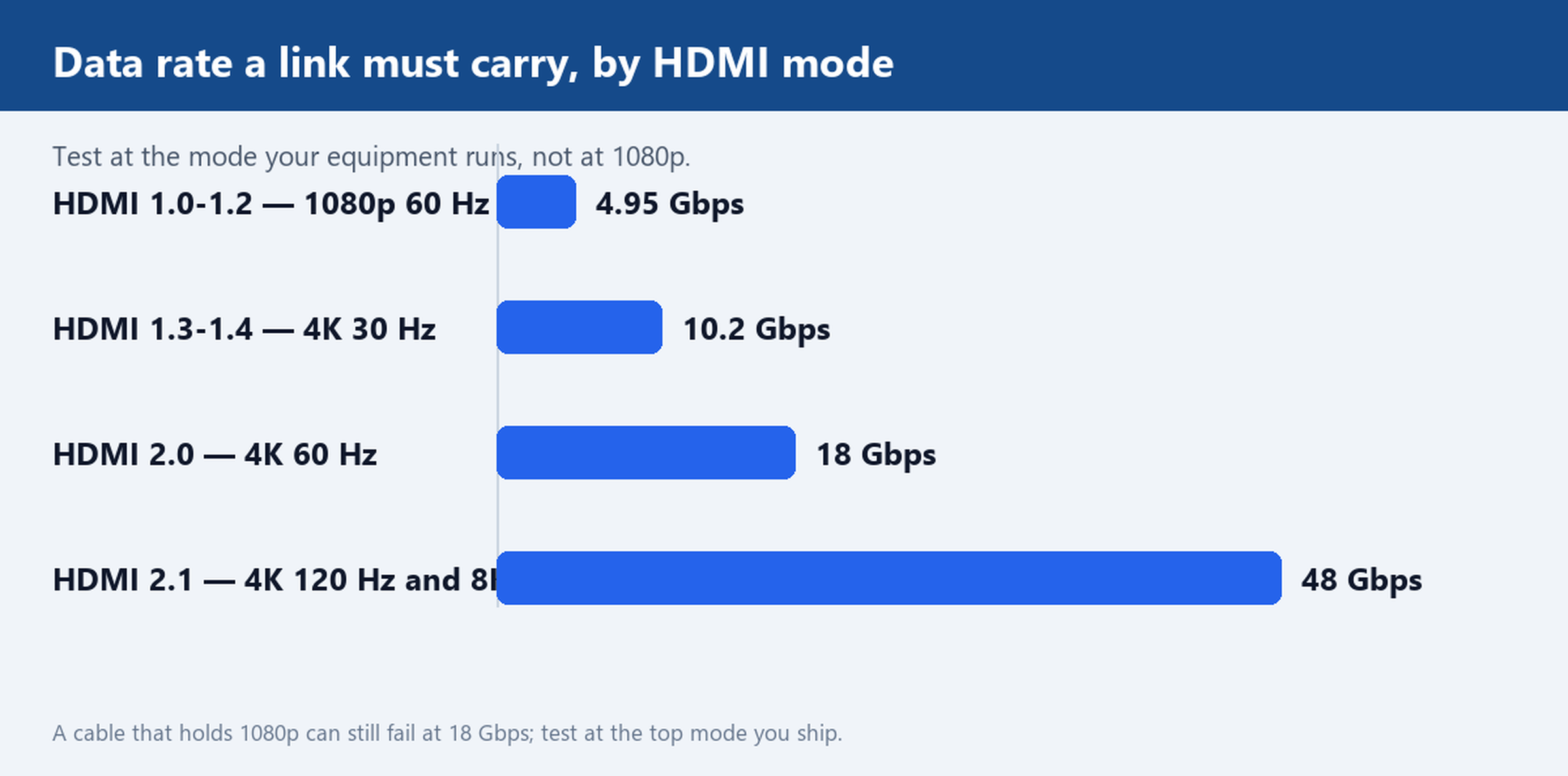
Bar chart of HDMI data rates: 4.95 Gbps for 1080p at 60 Hz, 10.2 Gbps for 4K at 30 Hz, 18 Gbps for 4K at 60 Hz and 48 Gbps for 4K at 120 Hz and 8K
Continuity can pass at 1080p and the same cable can fail at 18 Gbps.

Testing at the resolution you actually run, not at 1080p

Continuity proves the wires exist; only a live link proves the cable holds the data rate. The rates are not close together: 1080p at 60 Hz fits in the 4.95 Gbps class of early HDMI, 4K at 30 Hz fits in the 10.2 Gbps class, 4K at 60 Hz with full colour needs the 18 Gbps of HDMI 2.0, and 4K at 120 Hz or 8K needs 48 Gbps. A cable that plays 1080p for hours can fail at 18 Gbps in the first minute.

So test on the source and display combination you actually ship with, set to the top mode the product claims. The 4K HDMI 2.0 Braided Flat Cable, Gold Plated, for example, should be sampled against a source and display both locked to 4K at 60 Hz. Watch for the classic symptoms of a marginal link at rate: single-pixel sparkles, short blackouts during motion, or a handshake that needs several replug attempts. Let the link run for a defined soak period, ten to fifteen minutes is enough for most faults to surface, and record the mode used. The same rule applies to converter builds such as the USB-C to HDMI 4K 60Hz Cable, 1.8 m, where the whole assembly, not just the HDMI plug, has to hold the mode.

Failures that still pass a continuity test

Four failures pass a static bench and reject themselves only in service:

  • Intermittent contact under flex. A conductor cracked inside the mould reads fine at rest and drops when the cable bends. Flex the cable through its working radius during the live test.
  • Damaged shield. Continuity on every pin tells you nothing about braid coverage or a torn foil. Run the live link next to a known interference source; a failing shield shows as sparkles or audio ticks that a clean bench hides.
  • Wrong internal pinout at the plug. A crimp that lands a pair on the wrong blades still gives continuity, but swaps signal groups and fails at rate. The pin-map test in the previous section catches this only if you label which blade lands on which conductor end.
  • Connector fit. A plug that wobbles in the socket works on the bench and disconnects in the rack. Check retention by feel on every sampled unit, with the weight of the cable hanging on the plug.

What to write into the PO and the inspection checklist

Acceptance is enforceable only when the criteria are written before the lot ships. Three clauses do most of the work:

  • Test scope. Hundred percent pin continuity on every unit in the lot, plus a live-link soak at the rated mode on a stated sample per batch, with the mode and duration named.
  • Pass criteria. Continuity near an ohm or less per pin, no shorts between adjacent conductors, and a soak with no sparkles, dropouts or replug events.
  • Rejection rule. Any failure in the sample sends the batch back for retest of the full lot, and the retest record ships with the replacement.

Where the cable is custom in length or jacket, fold the same clauses into the custom sheet before tooling; the Customize Cable page lists what such a sheet should carry. For the products themselves, start from the HDMI Cables and HDMI 2.0 Cables categories, and the Audio & Video Cables category for the wider family. The Factory page covers line-side QC and How to order explains the sampling and confirmation sequence step by step.

Send your resolution and length requirement, and we will ship a sample HDMI cable with the test result recorded on the same production batch. A sample that arrives with its own test record is the fastest way to make the acceptance routine above a formality rather than a fight.

Short on time? The 76-second version covers the same three checks.
Read more...

Braided vs PVC Cable: Choosing the Right Jacket for Your Order

Two cables built on the same copper can feel nothing alike in the hand, and the jacket is almost always why. Buyers weighing braided against PVC want one answer: which construction survives the way this cable actually gets used. Braid buys abrasion resistance, grip and a softer drape. PVC buys lower unit cost, a smaller outer diameter and predictable tooling. Braid does not buy heat resistance, better shielding or longer life on its own, and plenty of change requests arrive with that assumption attached.

This guide covers what each jacket is, where each one really wins, and how the braided vs PVC cable decision moves tooling, artwork approval and repeat orders.

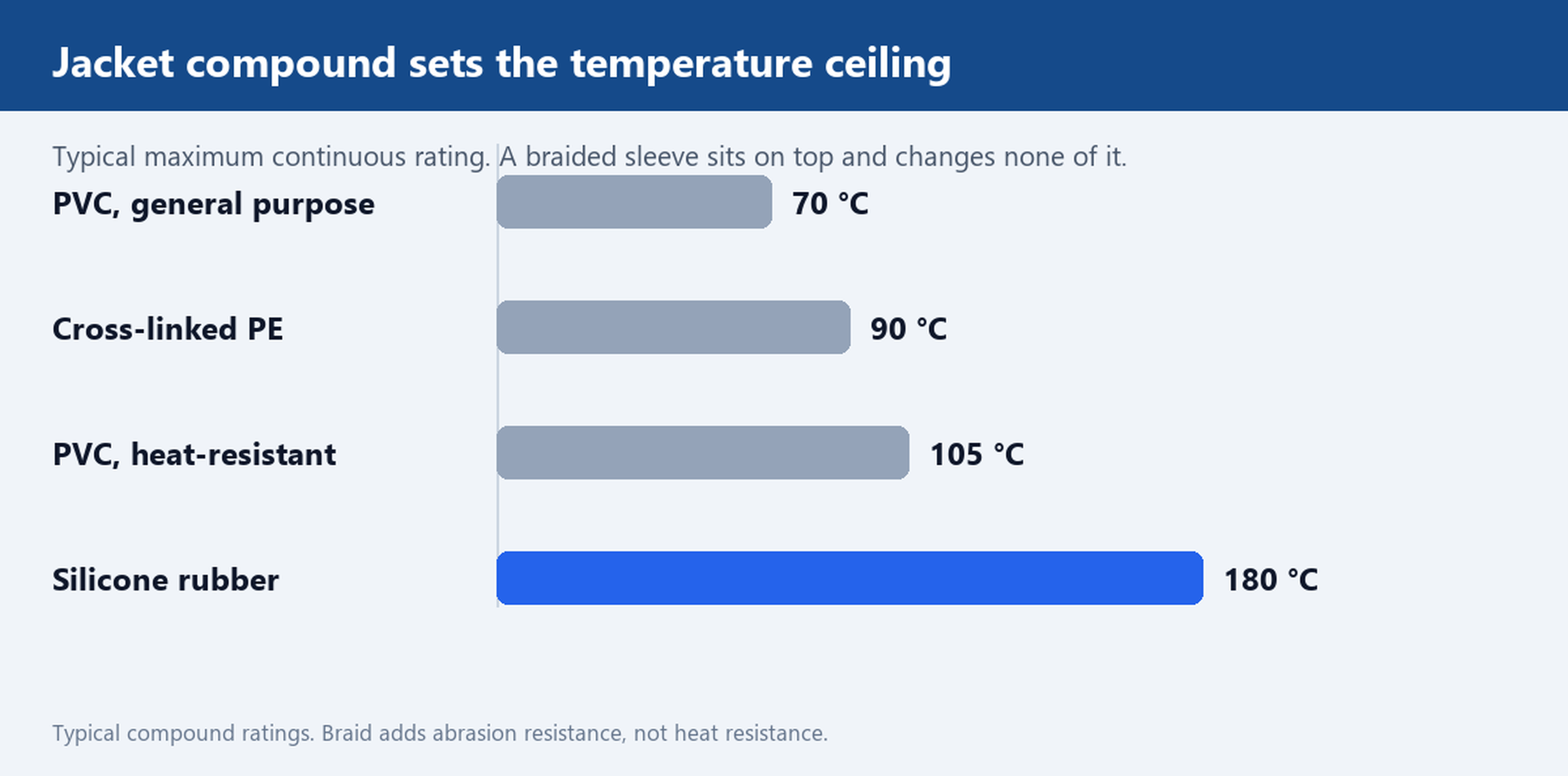
Bar chart of typical temperature ratings by jacket compound: PVC 70, cross-linked PE 90, heat-resistant PVC 105 and silicone 180 degrees Celsius
The compound sets the limit, not the weave.

What each jacket is actually made of

A PVC cable is a conductor bundle with extruded polyvinyl chloride over it, produced in a single pass at a fixed outer diameter. The compound is formulated for flexibility, flame behaviour and surface finish, and the extrusion die sets the diameter everything downstream depends on.

A braided cable adds a woven textile sleeve over that same core, usually nylon or polyester, often over a second thin jacket. The braid is a sleeve. It is not insulation and it is not the flame barrier. Ask which layer carries the temperature or flame rating and the answer points to the compound underneath.

That fact settles most arguments in this category. A braided assembly is mechanically different from a PVC one and electrically the same, unless the buyer also changes stranding, shield coverage or gauge.

Where braided construction earns its cost

Braid solves mechanical problems well in four situations:

  • Sliding abrasion. Cables dragged across stage floors or rolled under pedalboards wear on the outer surface first. A tight weave spreads that contact across many filaments instead of one smooth wall.
  • Point loads. A truss clamp pinches a cable in one spot. Braid spreads the load around the circumference, which keeps the jacket from taking a permanent set.
  • Grip and drape. Textile does not go slick when hands are damp and hangs with fewer kinks than a glossy extrusion.
  • Surface appearance. A matte weave hides scuffs that show immediately on gloss PVC, which matters for rental fleets and product photos.

For a braided microphone cable, the construction and gauge make the difference checkable rather than a finish claim. The balanced braided XLR assembly is a useful reference build, and the microphone and XLR cable category covers the range.

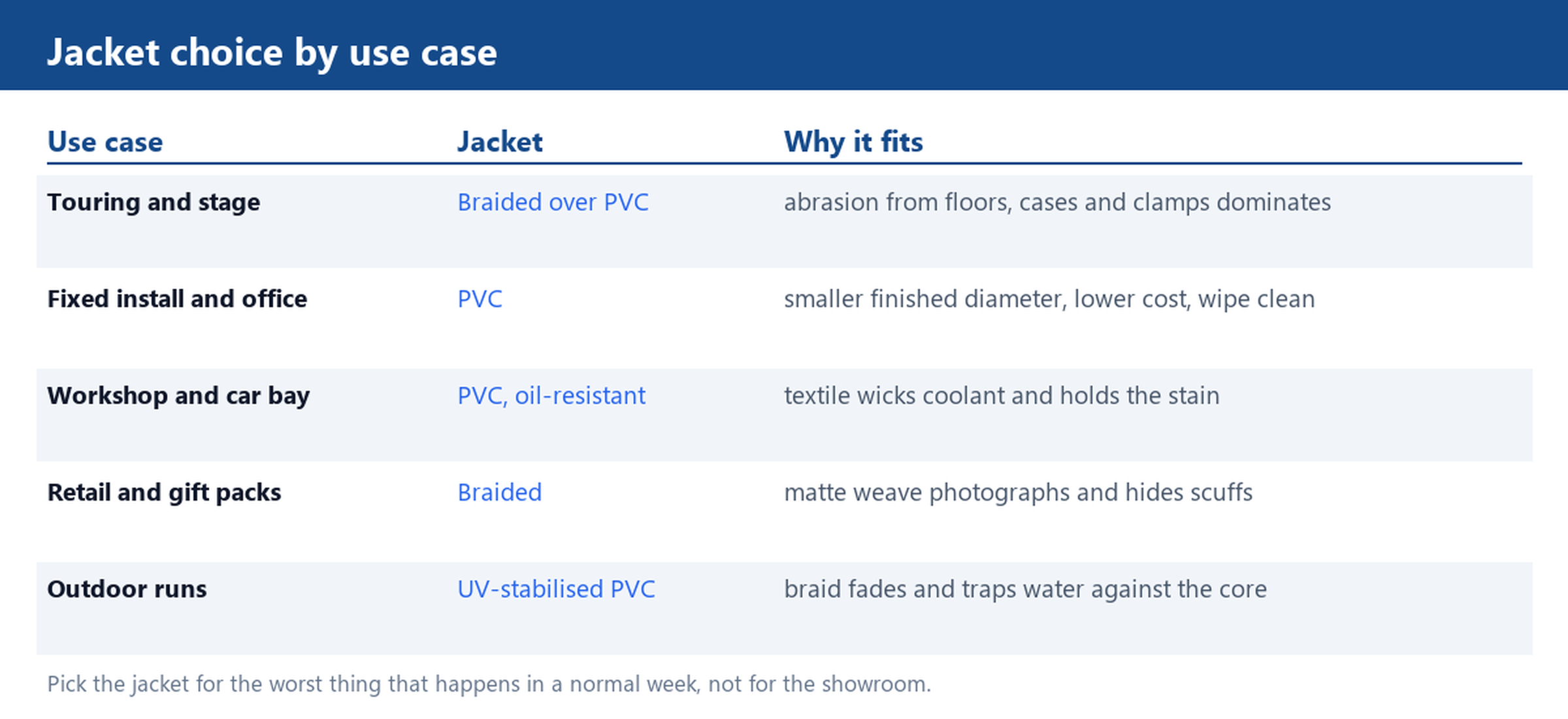
Table mapping five use cases to a jacket: touring and retail to braided, fixed install and workshop to PVC, outdoor runs to UV-stabilised PVC
Pick for the worst thing that happens in a normal week.

Where PVC is the practical choice

PVC wins on what appears in a purchase order rather than a product photo:

  • Unit cost. One extrusion pass, against an extrusion plus a braiding step, plus yarn, plus end finishing.
  • Outer diameter. At the same conductor and shield, PVC gives the smaller finished diameter, which decides whether the cable fits a backshell, a grommet or a conduit.
  • Cleanability. A shop rag with a mild solvent takes grease off PVC. Textile absorbs it and holds the stain.
  • Marking. Length marks and part numbers print directly on PVC. On braid they need a sleeve or a printed band, which is a separate artwork approval.

For fixed installs, patch panels and OEM builds where the cable is never handled, PVC is usually the sound answer. The PVC XLR range exists for exactly that reason.

What the jacket does not change

Four properties stay where they were, whatever the outer layer looks like:

  • Temperature ceiling. Set by the compound, not the weave. General-purpose PVC is commonly rated to 70 °C, heat-resistant grades to 105 °C, cross-linked polyethylene to 90 °C and silicone to 180 °C. Braid over a 70 °C core is still a 70 °C cable.
  • Shielding. Foil, spiral or braided copper shield decisions sit under the jacket and decide interference performance. A textile sleeve does nothing for shielding.
  • Conductor and gauge. Voltage drop, current capacity and flexibility all come from the copper and the stranding.
  • Connector plating. Contact life and mating cycles are a connector decision.

If a project needs a higher temperature rating, the fix is a different compound, not a braid. That is the most common mis-buy here and the easiest to prevent with a two-line spec.

Matching the jacket to the use case

Name the worst thing that will happen to the cable in a normal week — dragged over a floor, crushed in a bag, coiled wet, or never touched — then match it:

  • Touring and stage. Braided over PVC, because abrasion and handling dominate every other property.
  • Fixed install and office. PVC, because nothing touches it and diameter matters.
  • Workshop and automotive bay. PVC in an oil-resistant grade, because textile wicks coolant.
  • Retail and gift packaging. Braided, because the unboxing is part of the product.
  • Outdoor runs. Neither on its own. Specify a UV-stabilised compound and a path for water to drain.

How the choice changes tooling and repeat orders

Braid adds process steps: yarn sourcing, a braiding pass, and end finishing so the sleeve does not fray at the cut. Those steps lengthen the production cycle and add parameters to hold constant between lots. PVC adds none of that, but it locks in the extrusion die, so a diameter change on a repeat order means new tooling.

Either way, four items belong in writing before the first run: the compound and its rating, the finished outer diameter with a tolerance, a physical colour reference rather than a colour name, and the marking method — printed on the jacket, or on a sleeve. Agree those four and a repeat order becomes a part number. Leave them verbal and every lot becomes a negotiation.

Jacket samples of both constructions can ship with any quote. Send the drawing with the compound, the finished diameter and the marking method, and we will confirm feasibility. The customize cable page lists the options, and how to order lists the drawing fields we need.

Read more...
ISO 9001 quality systemCE · FCC · RoHS · REACH compliantOwn factory, 3,000 m² · 200+ staffExport to 110+ countriesReply within 24 hours