

A desk refresh is moving through the office: two monitors are going up, the graphics card at the back of the PC still offers two DVI ports, and the purchase order for cables has to be cut this week. Ordering a dvi cable for dual monitor setups looks like a one-line item, yet the DVI family splits into three socket types and five pin counts, and one wrong batch becomes a full return shipment. This guide shows how to read the socket on the back of each screen, how to translate the pin count into the right catalogue line, and how to keep a two-screen desk on two clean cable runs.
Which DVI socket is actually on the monitor: DVI-D, DVI-I or DVI-A
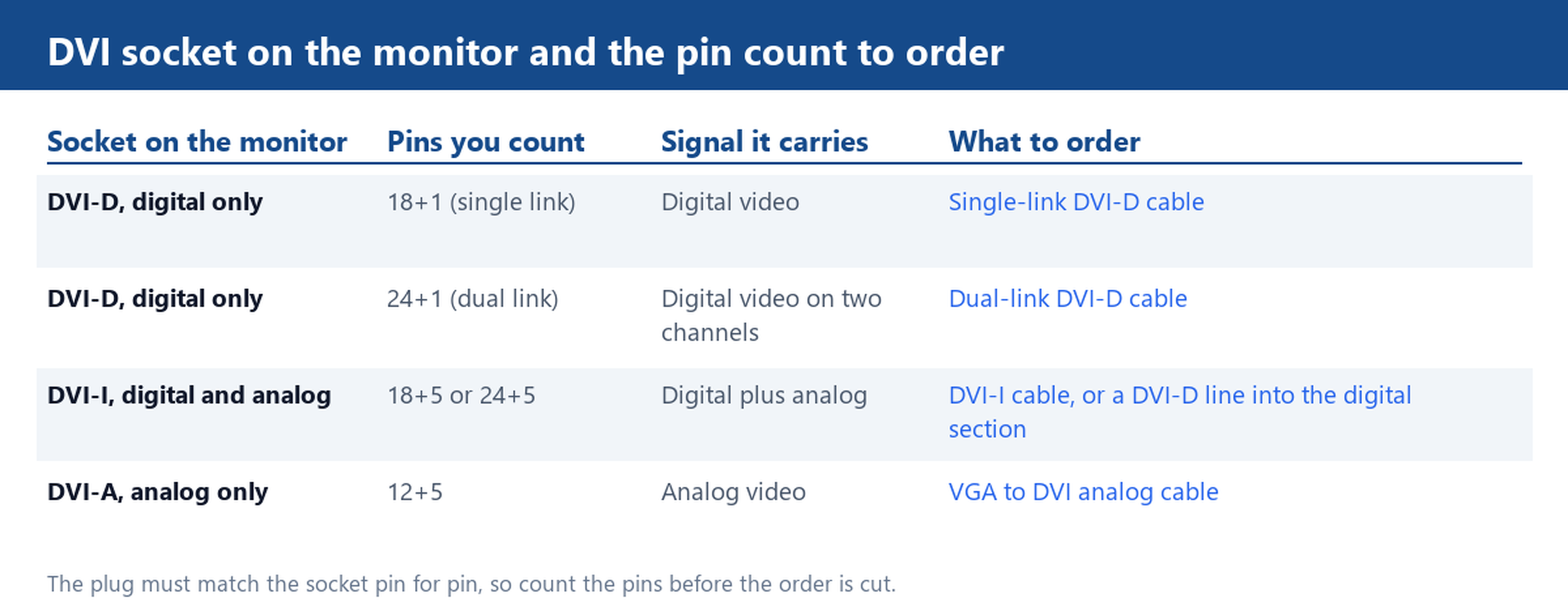
Every ordering mistake starts at the socket, so identify it before anything else. Look at the connector block and the wide flat blade that sits below the pins. A DVI-D socket carries digital video only: pins sit in one or two horizontal rows above the blade, with nothing beside the blade itself. A DVI-I socket adds four pins clustered around the blade, and those four are the analog section. A DVI-A socket keeps the analog section and drops the digital rows, which is rare on monitors and more common on legacy projector walls.
The practical test takes ten seconds with a phone camera. Photograph the port straight on, count the rows above the blade, and check whether four small pins hug the blade. If the monitor only has an analog DVI section, note that a digital DVI-D line cannot drive it; the analog path runs through the VGA to DVI cables family instead. If the screen is digital, which most office panels are, any line in the DVI cables catalogue starts from the same digital section.
24+1 or 12+5: reading the pin count before you order
Suppliers describe DVI plugs by a pair of numbers: pins in the main block, then pins beside the blade. The mapping is fixed across the industry:
- 18+1 pins: DVI-D, single link, digital video.
- 24+1 pins: DVI-D, dual link, digital video on two channels.
- 18+5 pins: DVI-I, single link, digital plus analog.
- 24+5 pins: DVI-I, dual link, digital plus analog.
- 12+5 pins: DVI-A, analog video only.
Two fitting rules follow. First, a 24+1 plug will not enter an 18+1 socket, because the single-link socket has no room for the second row, so a dual-link plug ordered for a single-link desk goes straight back. Second, a dual-link socket accepts a single-link plug, which is why a 24+1 socket can still run with an 18+1 cable at single-link speed. Our DVI Cable 24+1 and 24+5 Pin, 28AWG covers both DVI-D and DVI-I dual-link builds, and the HDMI A to DVI-A Analogue Cable, 12+5 Pin serves the analog corner cases.
Single-link and dual-link: why the second channel decides the cable
Beneath the pin count sits the question that decides whether a panel lights up at full size: how many TMDS channels does the run carry. A single-link cable carries one channel clocked up to 165 MHz, which covers a 1920 x 1200 panel at 60 Hz. A dual-link cable adds a second channel and lifts the ceiling to 2560 x 1600 at 60 Hz. Put a single-link cable on a 2560 x 1600 panel and the screen either stays dark or drops to a lower mode, because the pixel budget is simply not there.
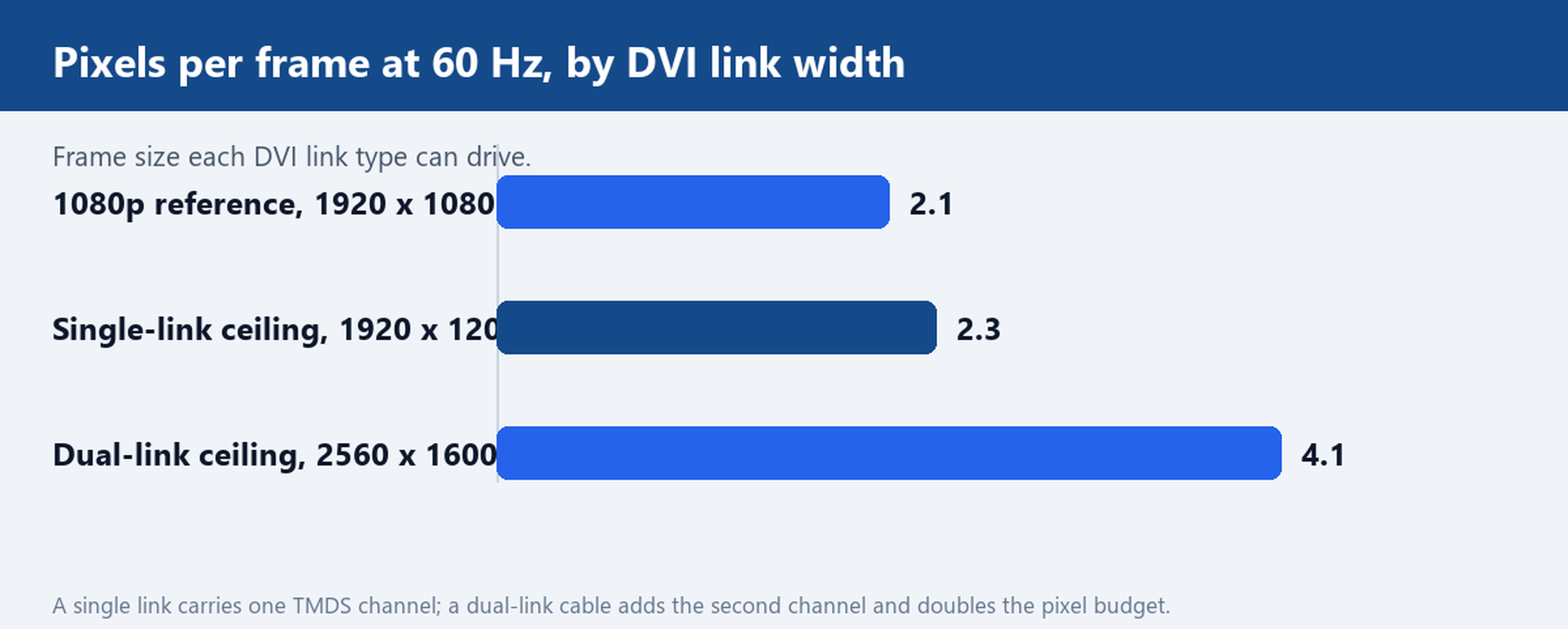
For a bulk order the check is cheap: list the native resolution of every screen on the desk, and any panel above 1920 x 1200 at 60 Hz gets a dual-link run. Panels at 1080p or below sit inside the single-link budget, so there is no need to pay for channels the panel will not use.
One run per screen: ordering two cables for a dual-monitor desk
DVI carries one display per cable and does not chain, so a dual-monitor desk means two independent runs, each matched to its own monitor socket. The common failure is buying one SKU for both screens when the desk mixes generations: the newer panel takes a 24+1 digital line while the older one carries an 18+5 combined socket. Sort the order by socket, not by desk.
Three details finish the job. Match each run to the distance it covers, because a longer run wants a lower gauge conductor to hold the signal. Check that the graphics card actually has two outputs of the right family before assuming two DVI runs, since many current cards mix DVI with HDMI or DisplayPort. And if the two runs need different lengths, colours or packing, the Customize Cable service builds each run to its own specification.
HDMI-to-DVI and 18+1 / 13+1 builds: where an adapter fits
A dual-monitor desk often pairs one DVI panel with an output the card no longer offers in DVI form. HDMI and DVI-D share the same TMDS digital signalling, so a passive HDMI-to-DVI cable moves video between them without converters in the path. Two limits from the spec sheet apply: DVI does not carry audio, so sound has to travel on a separate lead, and the DVI end must be built in the pin layout the monitor expects.
Our HDMI to DVI Cable, Male to Male, 18+1 / 13+1 Pin is built in the 18+1 or 13+1 pin layout the order specifies, rated up to 10.2 Gbps per factory test, with 24K gold plated or nickel plated contacts and foil plus braid shielding. That makes it the bridge line when the second screen has to come off an HDMI output.
Before the bulk order is cut, send a photo of the monitor and PC port labels and we will confirm the DVI variant and pin count for each run. One verified photo per screen is all it takes to keep the whole desk on the right cable the first time.