

Most DisplayPort orders that come back as complaints fail at the plug, not at the panel. The buyer checked the resolution, the refresh rate and the price, and then received a cable whose connector does not fit the socket on the back of the screen. DisplayPort buying carries one decision that HDMI buying does not: the same signal family ships in a full-size 20-pin connector and in a Mini DisplayPort plug, and the two are not interchangeable. Work through the five choices below in order and the order form writes itself. The current product families all sit in the DisplayPort cables category, so each choice below maps to stock you can actually quote against.
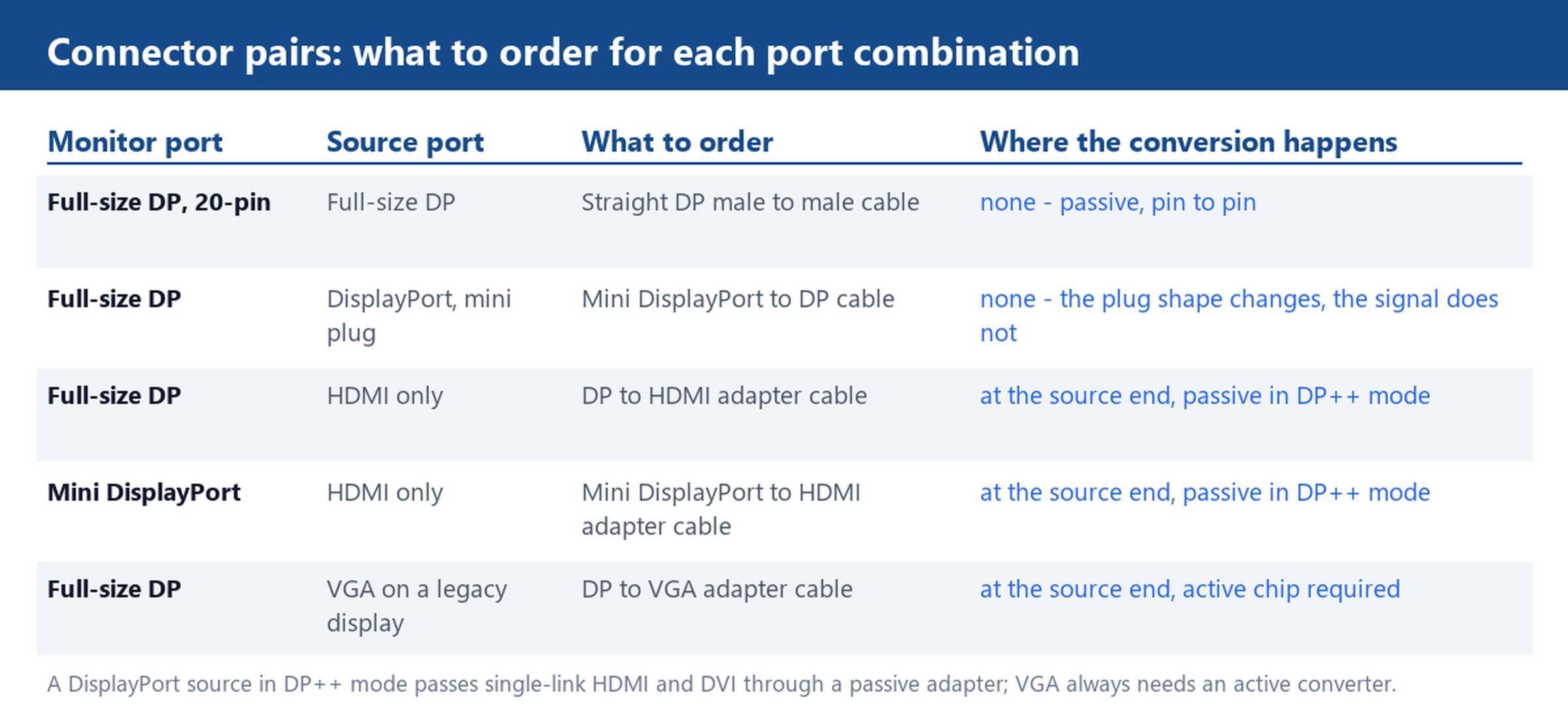
Look at the monitor port first: 20-pin full-size vs Mini DisplayPort
The full-size DisplayPort connector is a 20-pin plug with a small notch on one edge; the Mini DisplayPort plug carries the same 20-pin layout in a shell roughly half the width. That detail matters more than anything printed on the box: a Mini DisplayPort to DisplayPort cable is a shape change, not a signal conversion, so it costs you nothing in bandwidth. Count the pins or measure the plug before you order. If the port has no notch and is about half the height of a USB plug, treat it as Mini DisplayPort and put that plug on at least one end of the cable.
Where each plug shows up is fairly consistent. Monitors and desktop graphics cards use the full-size 20-pin connector. Older laptops and some docking outputs use the mini plug, which shares its shape with Thunderbolt 1 and Thunderbolt 2 ports. A phone photo of both ends, sent with the RFQ, removes the last doubt.
What DisplayPort 1.2 carries and where an HDMI 1.4 adapter sits
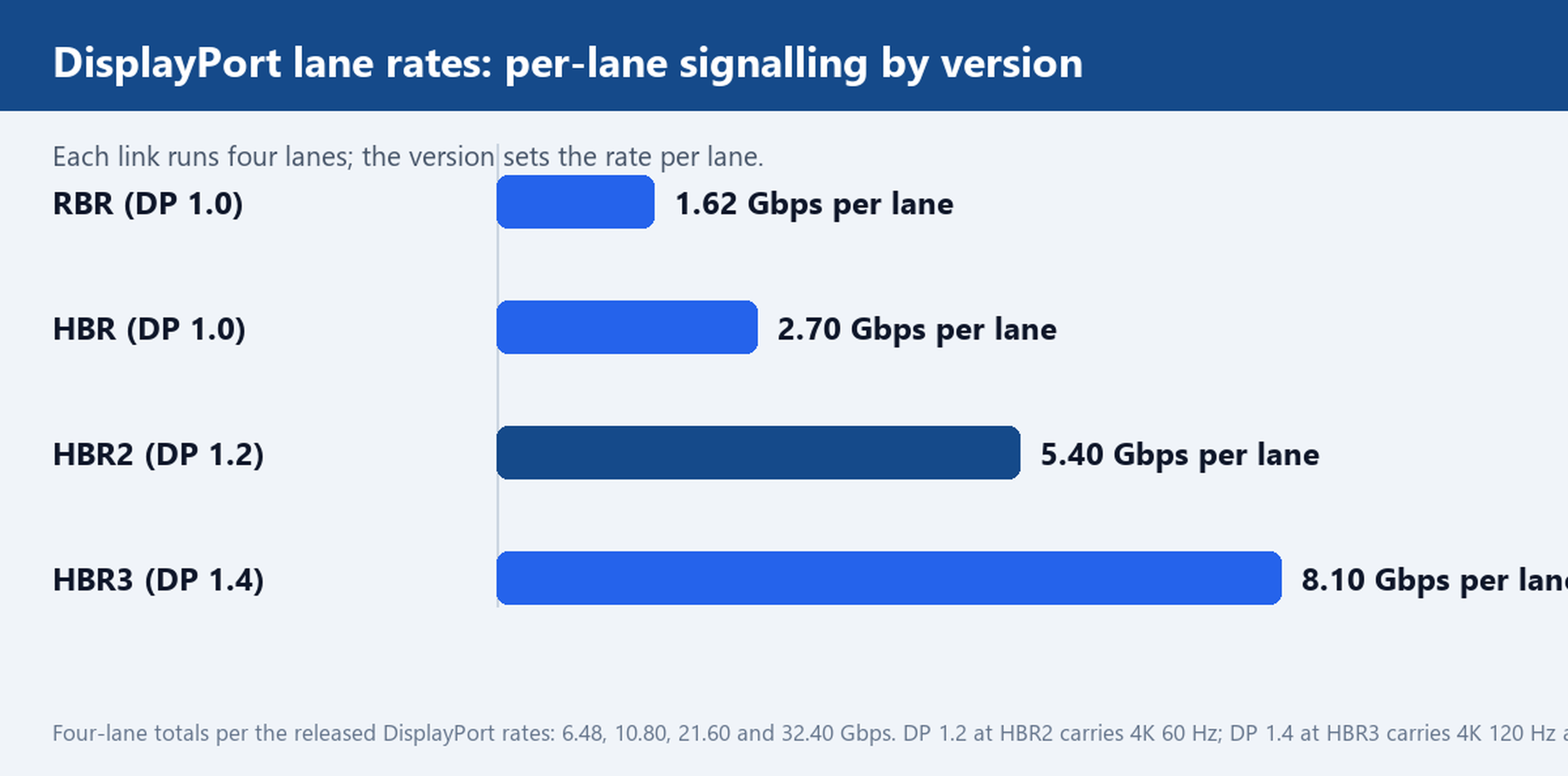
A DisplayPort link runs four data lanes. DisplayPort 1.2 clocks each lane at HBR2, 5.40 Gbps, for a total of 21.60 Gbps, which carries 4K at 60 Hz. DisplayPort 1.4 lifts the lane rate to HBR3, 8.10 Gbps, for 32.40 Gbps in total, which covers 4K at 120 Hz and 8K with display stream compression. HDMI 1.4 sits below that: its 10.2 Gbps class carries 4K at 30 Hz and nothing faster.
This is where adapter orders quietly lose capability. If your source has a DisplayPort output and the monitor takes HDMI 1.4, a DisplayPort 1.2 to HDMI 1.4 adapter cable tops out at 4K 30 Hz on the HDMI side, and no firmware update raises that ceiling. Name the version on both ends in the RFQ, and match the adapter to the mode you actually run, not the mode you hope to run next year.
Straight cable or adapter cable: the extra joint and what it costs you
When both ends speak DisplayPort, a straight male-to-male cable is the simpler answer: passive, pin to pin, nothing to convert. Every conversion you add changes that. DisplayPort sources in DP++ mode pass a single-link HDMI or DVI signal through a passive adapter, which works well at 1080p and 4K 30 Hz. VGA is different: a DP to VGA adapter cable needs an active converter chip, because there is no analog signal inside a DisplayPort link to tap passively.
The extra joint costs you in testing time, not just in parts. Each conversion point is one more set of solder joints and one more chip on the bench checklist. The working rule: keep the conversion at one end only, prefer a straight cable whenever the two ports match, and bench-test the exact monitor pair before you commit a batch.
Stock lengths: 1.8 m runs, short pigtail adapters and custom lengths
DisplayPort stock concentrates at 1.8 m, and for a reason: it covers the run from the desk PC to the monitor with margin, and it holds HBR2 signalling without active electronics. The Mini DisplayPort to DisplayPort Cable 1.8 m is a typical example – one stocked length, one connector pair, easy to sample and easy to re-order.
Short pigtail adapters serve the opposite case, where the adapter hangs directly off the source or the monitor and the fixed run is handled by a separate cable. If your routing needs more than 2 m, do not assume a longer passive run will hold 4K 60 Hz; ask for heavier conductor cores or an active design, and have the exact length bench-tested. For non-standard runs, the custom cable service takes the length, jacket and connector pair as build parameters instead of forcing the run into a stock size.
Five lines to put on the RFQ before you compare quotes
A DisplayPort RFQ with the five lines below gets comparable quotes back on the first pass, because every supplier prices the same product:
- Connector pair and gender on each end – full-size 20-pin or Mini DisplayPort; attach the port photo.
- DisplayPort version and target mode – DP 1.2 at 4K 60 Hz or DP 1.4, named on both ends.
- Passive or active conversion, and which end the adapter sits on.
- Length and jacket, plus confirmation the exact length is bench-tested at 4K 60 Hz before packing.
- Sample terms – one 1.8 m sample per connector pair for the bench, then the batch order.
The How to order page walks through the drawing and sample steps in that sequence.
Send a photo of both ports on your monitor and source device, and the factory will confirm the connector pair and ship a 1.8 m sample for bench testing. That one photo settles more connector arguments than any datasheet.