

Ask a returns desk which complaint is hardest to prove, and the answer is usually the same one: the cable charges the phone, but the computer never sees it. Nothing looks broken, no pin is bent, and the customer cannot film a fault that shows up as an unlit port. For a buyer holding a returned lot, the practical way to settle that argument is a repeatable bench routine. This guide shows how to test iPhone USB cable stock in about twenty minutes per sample, using one working phone, one computer and an inexpensive inline meter.
What an 8-Pin Plug Carries That a Plain USB-A Run Does Not
A standard USB-A lead is a four-wire part. Pin 1 is VBUS at 5 V, pins 2 and 3 are the D-minus and D-plus pair, and pin 4 is ground. Everything the host and the device agree on travels over that pair, including how much current the device is allowed to draw.
The small end is a different animal. The receptacle on the phone holds eight contacts in a single row, and the plug carries duplicated contacts on both faces so it mates either way up. That duplication is exactly why an 8-pin cable can pass a charge test in one orientation and fail in the other: only one face is in use at a time, and the unused face stays invisible until somebody flips the plug.
Two consequences follow for anyone qualifying a lot. First, a single dirty or worn contact can remove power, data, or the identification line on its own, so a cable that charges proves very little about the rest of it. Second, the eight contacts are not equally loaded. VBUS and ground carry the whole current, while the data and identification contacts carry almost none, which is why arcing marks show up at the outer edges of the row rather than in the middle.
The plugs sold for this family sit under iPhone USB cables, and the wider USB cable catalogue covers the A-to-8-pin runs that share the same overmould and jacket.
Contact, Retention and the Click: Three Checks Without a Meter
None of these three checks needs an instrument, and together they catch most of the cables that come back from a retail channel. Run them in this order, because a cable that fails the first one does not deserve bench time.
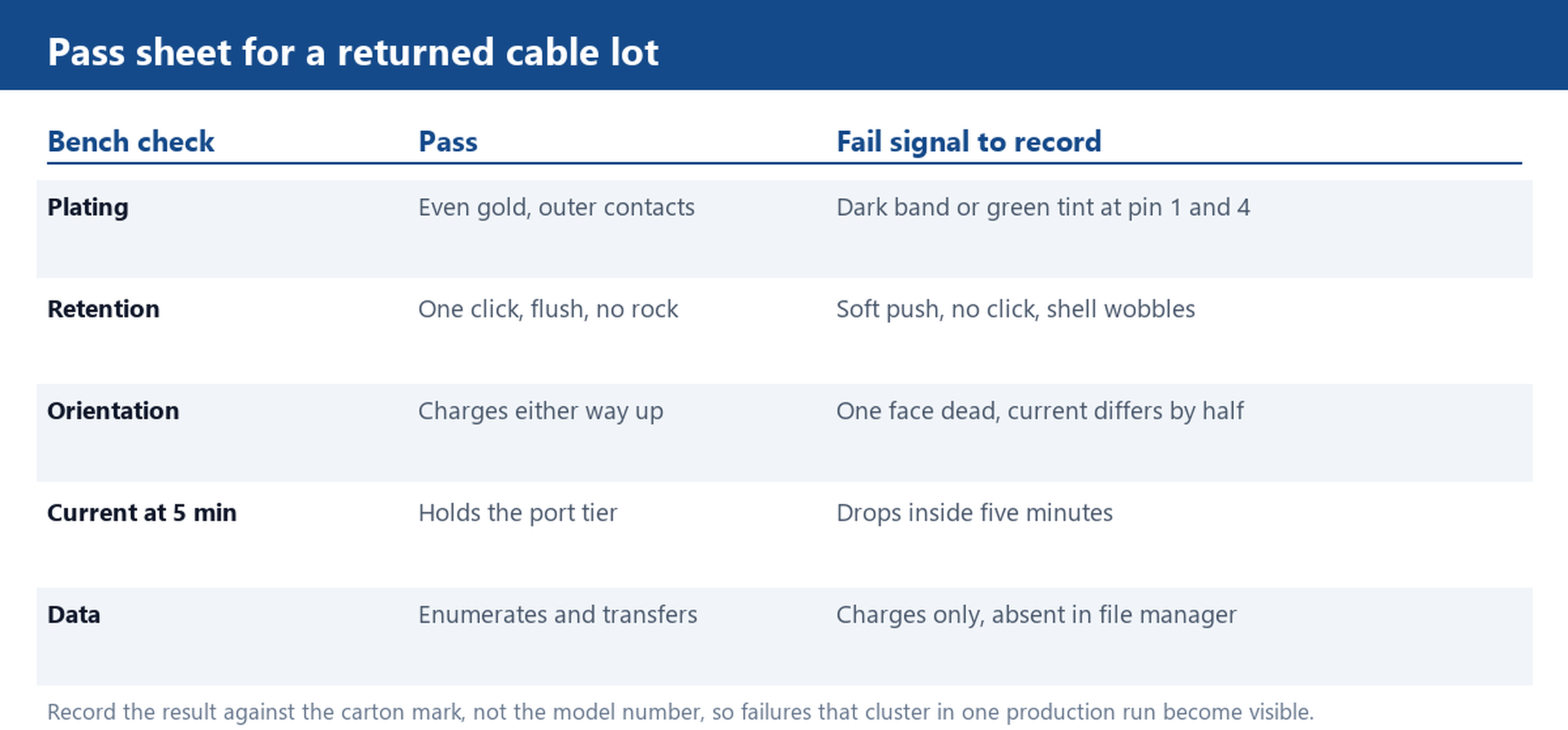
Read the plating. Hold the plug under a desk lamp and look at the two outermost contacts, which are the power pair. Clean gold has an even warm tone. A dark grey or brown band means arcing has already burned the plating, and the contact will keep getting worse as the pit deepens. Green tint is copper that has been exposed to moisture. Both are terminal for a resale lot, because no cleaning step restores a plated surface that has been eaten through.
Listen for the click. Seat the plug in a known-good phone. A healthy plug goes in with one distinct click, sits flush against the case, and does not rock when you push the shell sideways. A worn plug slides in with a soft push, produces no click, and wobbles. The wobble is the early warning: the retention springs in the receptacle are now taking all the load, and the next failure will appear on the phone side, not on the cable.
Pull straight, once. With the phone held flat, pull the plug straight out with two fingers at a steady rate. It should release with a small, definite resistance. If it lets go before the shell has moved, the retention is gone. Never test this by swinging the phone from the cable: that bends the strain relief and tells you nothing about the contacts.
Then flip it. This is the check most buyers skip and the one that catches the classic 8-pin failure. Charge the phone for thirty seconds with the plug one way up, note the current, unplug, rotate the plug 180 degrees and repeat. If one orientation charges and the other does not, a contact on one face is open, and the cable will fail intermittently in the field depending on which way the user happens to insert it. Cables that behave this way are the most expensive kind of return, because they pass every test that a warehouse runs once.
Charge Current Over Five Minutes: Catching a Cable That Fades
Current is the number that turns a subjective complaint into a measurement. Put an inline meter between the charger and the A-end of the cable, plug into a phone at roughly half charge so the phone is not tapering on its own, and write down the reading at the start, at one minute, at three minutes and at five minutes.
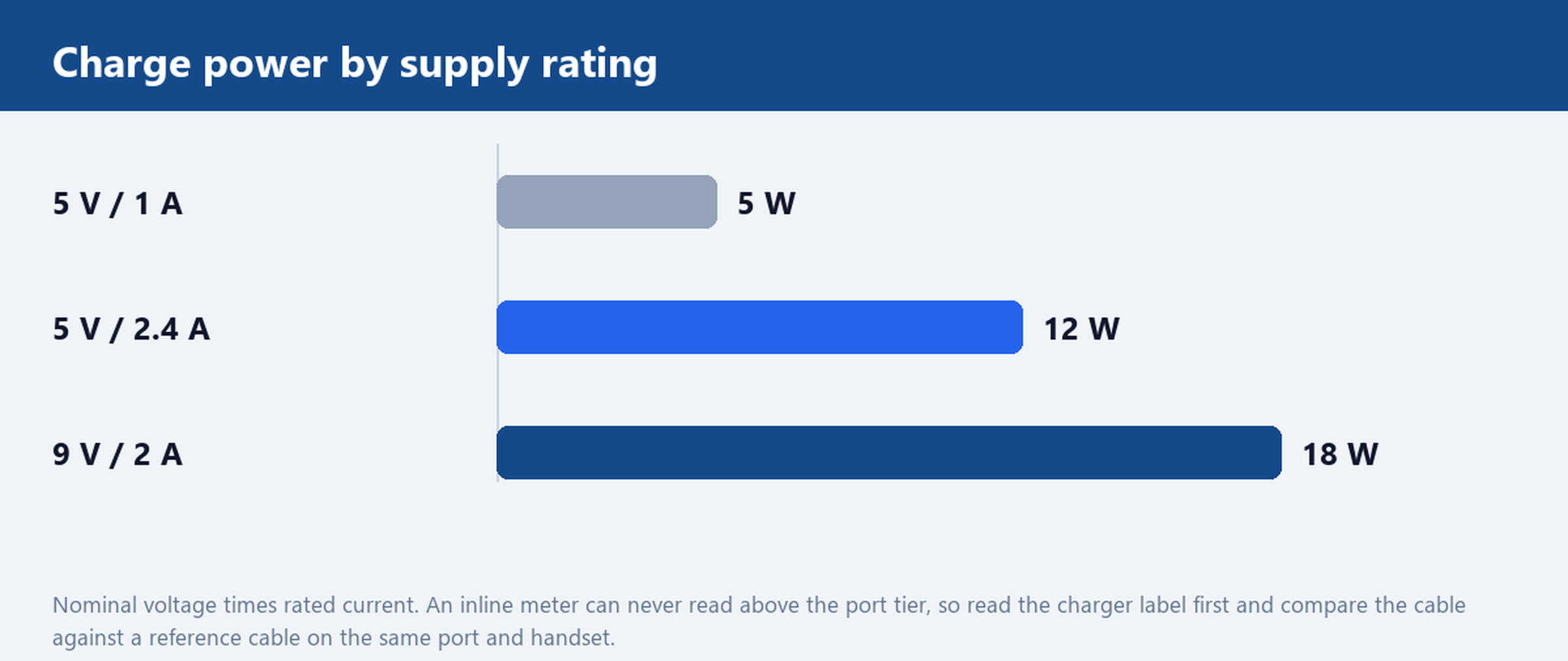
Know the ceiling before you start. A plain 5 V / 1 A port delivers 5 W, and a 5 V / 2.4 A port delivers 12 W, which is the tier most 8-pin cables are built for. The reading on the meter can never exceed what the port and the phone agree on, so a cable that shows 5 W on a 12 W port is either the limiting part or a victim of a conservative handshake. Compare against a reference cable on the same charger, same phone and same state of charge; the gap between the two is the figure that means anything.
A failing cable fades rather than fails. Contact resistance rises as the joint heats, the voltage at the phone end sags under load, and the phone steps down to a lower charging tier. On the meter this looks like a current that starts near the port ceiling and drops within the first few minutes, often settling well below it. Because the phone stays on charge, the user notices nothing except that the battery takes longer, which is why these cables survive a return window and then generate complaints months later.
Two conditions make the test repeatable. Keep the phone off and the screen dark, since a bright screen pulls power and muddies the reading. And run the whole five minutes at room temperature: a cable tested on a cold loading dock will look better than the same cable in a pocket.
Charging but Not Syncing: Separating Power Pins From Data Pins
When a cable charges but never appears on a computer, the fault is on the data pair, and the test is a file transfer rather than a current reading. Connect to a desktop, open the file manager, and watch whether the device enumerates at all. No enumeration means the data pair is open or shorted. Enumeration followed by a disconnect within seconds points at a marginal contact that breaks down as the connector warms.
Before condemning the cable, rule out the obvious confusions. A dirty charging port on the phone produces the same symptom, so repeat the test on a second handset. A charge-only promotional cable is built without data conductors on purpose, and no amount of rework will make it sync; the specification sheet or a look at the cut end will tell you whether data wires exist. That distinction matters commercially, because a charge-only part sold as a data cable is a specification error, while a data pair that has gone open is a quality escape, and the two need different conversations with the supplier.
Cables that combine two plugs are worth testing on both paths. A 2-in-1 Micro USB and 8-Pin zipper flat cable has two separate contact sets inside one shell, and it is common for one side to wear out first, so a single pass on the 8-pin end says nothing about the Micro end.
A Pass Sheet for a Returned Lot of iPhone USB Cables
A test only pays for itself if the result lands somewhere a planner can act on. Sort every sample into one of three buckets and record the reason next to the serial or carton mark, not next to the model number, because the point is to find out whether the failures cluster in one production run.
Bucket one is resale: plating clean, click present, both orientations charge within the port tier, and data enumerates. Bucket two is rework: electrical results fine but the shell is loose, the strain relief is cracked, or the plating is discoloured without a burn. These are the units worth re-terminating if the connector tooling is already in house. Bucket three is scrap: burned plating, an open face, a data pair that does not enumerate, or a current that collapses inside five minutes.
The pattern across buckets is what you take back to the supplier. A lot where most failures sit in bucket three on one carton usually points at a plating or crimp problem in a single run. A lot spread evenly across buckets usually points at the design, and the fix belongs in the specification rather than in the complaint. Either way, a written pass sheet with the four readings attached turns a vague claim about quality into something both sides can check.
If the pattern says the design needs to change, our custom cable service builds to drawing, including the overmould and strain relief that decide how long the exit survives, and the factory page explains how production and inspection are run. The full charger cable range and mobile phone cable range are organised by connector so you can shortlist before asking for samples.
Send the failing cable and the handset model it was used with, and we will run the same contact, current and sync checks on a sample before you re-quote the lot.