

A usb otg cable for phone repair is not a charging lead with a different plug. It is a role switch: the handset stops behaving like a power sink and starts acting as the host, so a keyboard, flash drive or card reader can be driven straight from the phone. On a repair bench that changes the workflow. A technician can pull a contact sheet off a customer handset, type into a device with no desktop nearby, or read phone storage through an OTG path before the board is opened. What decides whether the lead works is not the logo on the box. It comes down to three things this guide covers: the signaling rate the connector can actually carry, the length and form factor that suits the bench, and the power budget the phone port can supply to a bus-powered drive.
What an OTG Lead Adds to a Repair Bench
OTG stands for On-The-Go, and it describes a negotiation rather than a shape. On a Micro-B plug the fifth, or ID, pin is tied to ground to tell the phone it should take the host role. On a Type-C plug the same request is made over the CC line. Once the handset accepts the host role it enumerates whatever is plugged into the far end, in the same way a desktop would. That is the whole trick, and it is why a lead that only carries charge will never work for this job.
For a repair bench the practical gain is reach and speed of handling. Instead of tethering a phone to a PC to move a few files, the technician connects a USB flash drive or a card reader directly. A keyboard and mouse make text entry and menu navigation far faster on a damaged screen. Refurbishers use the same path to wipe or verify a handset before it goes back to stock. None of this needs a desktop, which is the point. Our mobile phone cable range covers the handset side of these setups: Mobile Phone Cables.
Micro-B at 480 Mbps or Type-C on 5 Gbps Wiring
The first spec to check is the signaling rate, and the connector largely sets the ceiling. A Micro-B OTG lead is built on USB 2.0 wiring. Even when the plug is the smaller reversible shape, a five-contact Micro-B interface has no SuperSpeed differential pairs, so the link tops out at the USB 2.0 High Speed rate of 480 Mbps. That is fine for a keyboard, a mouse or moving a batch of photos. It is a poor fit for large video files or a fast drive.
A Type-C OTG lead can be built on USB 3.2 Gen 1 wiring, which carries SuperSpeed pairs and reaches 5 Gbps, or on Gen 2 wiring at 10 Gbps. The physical plug does not guarantee the rate; the wire inside does. A Type-C shell on USB 2.0 conductors will still run at 480 Mbps. When you specify a lead, ask which conductor set is populated and which USB spec the pair count supports, not just which plug is on the end.
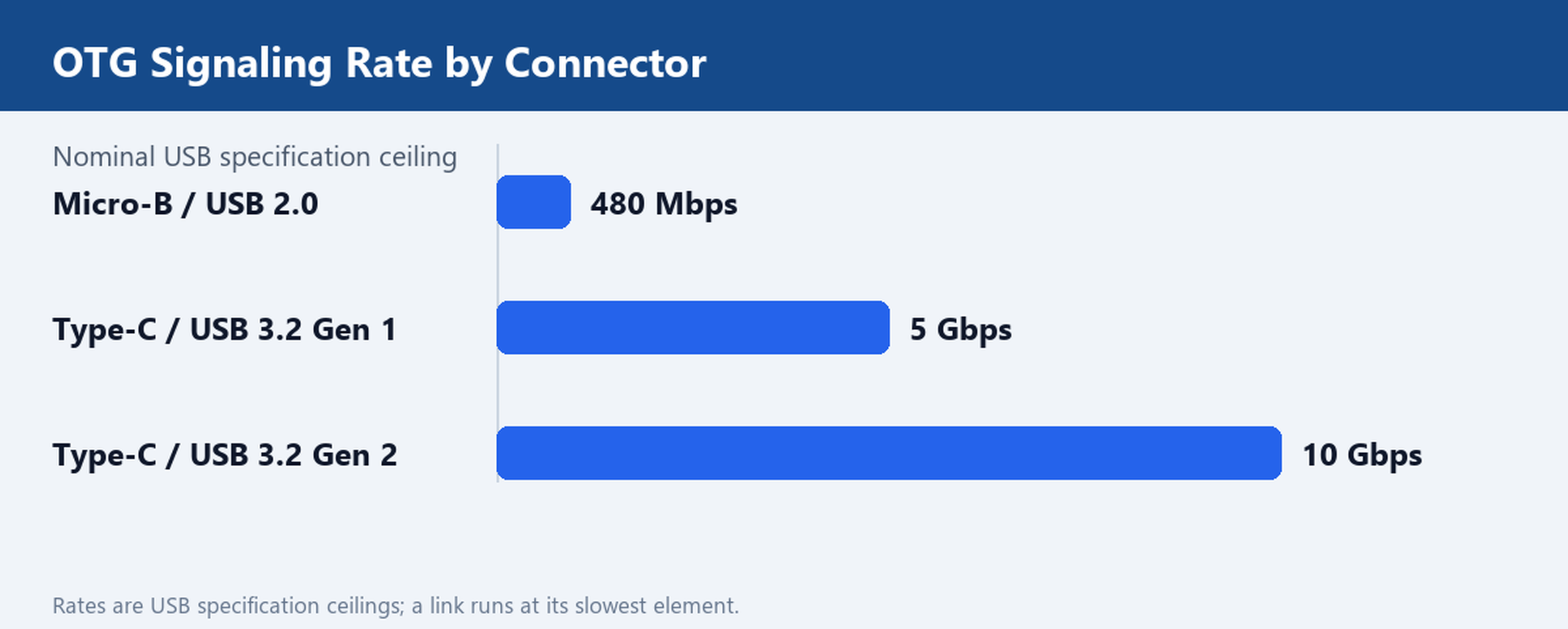
For the bench, treat 480 Mbps as the keyboard-and-drive tier and 5 Gbps as the storage tier. Compare the two rigidly: USB 2.0 Cables against USB 3.0 Cables. A worked example of the 5 Gbps build is the USB Type-C to USB 3.0 A Female OTG Cable, which exposes a standard A-female socket for ordinary flash drives.
A 10 cm Stub, a 1 m Braid or a 4-Port OTG Hub
Physical form matters as much as the electrical spec. A 10 cm stub keeps a flash drive or adapter close to the handset, so it does not lever against the phone port when the device lies face down on the mat. Bench technicians favor these short leads for repeated plug cycles: less cable to snag, less strain on the connector. A 1 m nylon-braid lead gives the operator room to set a keyboard and mouse beside the work area while the phone stays clamped or under an inspection lamp. The braid resists the abrasion that a bare jacket picks up on a metal bench edge.
When one port is not enough, a four-port OTG hub lets a keyboard, mouse and drive stay connected at once. Remember that the hub shares the upstream bandwidth and, more importantly, the phone power budget, which the next section covers. Our USB-C OTG Hub, 4-Port USB 3.1 is the multi-device option, while the USB 3.1 Type-C to A-Female Adapter is the single-device stub.
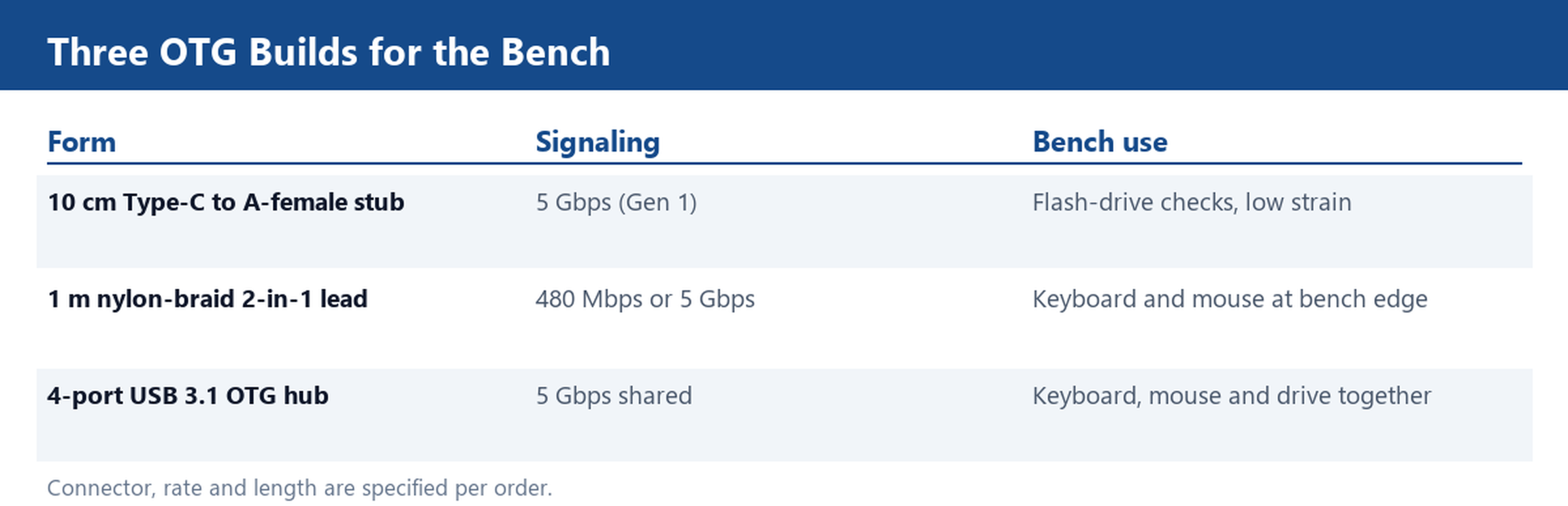
Lengths are not fixed. If the standard 10 cm and 1 m options do not fit the bench, the same connector set can be built to a different length on request through Customize Cable.
The Power Budget: Why a Bus-Powered Drive Drops Out
The most common field failure is not a data error. It is a drive that spins up, clicks once, and drops off the bus. The cause is current. Under the USB specification a device port supplies a baseline of 500 mA on USB 2.0 and 900 mA on USB 3.x before special charging modes are negotiated, and a handset acting as an OTG host rarely sustains more than that baseline for an external accessory. A 2.5 inch bus-powered hard drive can draw well over an amp at spin-up, so it browns out the moment the motor starts. A USB flash drive or a card reader draws a fraction of that and works reliably.
The practical test is to swap the storage device before blaming the lead: if a flash drive enumerates and the hard drive does not, the link is fine and the power budget is the limit. The fixes, in order, are to use a drive with its own supply, to place a powered hub between the phone and the drive, or to move the files through a low-draw flash drive or card reader. This is a property of the phone port and the storage device, not a defect in the OTG cable, so specify the accessory type alongside the lead.
Ordering Lines: Connector Mix, Lengths and the Compliance File
When you place the order, fix four fields up front. First, the host-side connector: Micro-B for older handsets, Type-C for current ones. Second, the device-side socket: A-female for ordinary flash drives and keyboards, or Type-C for newer accessories. Third, the conductor set and rate, 480 Mbps or 5 Gbps, tied to the USB 2.0 or USB 3.x spec rather than to a marketing name. Fourth, the length and jacket, 10 cm stub or 1 m braid, and any custom length you need.
Ask for the compliance file with the quote: the material declarations such as RoHS and REACH, the test report for the finished lead, and the drawing that fixes pinout and conductor gauge. What matters is that the documents exist and match the part, not a serial number on a certificate. If you are consolidating several bench configurations into one order, the How to Order page sets out the information we need, and the Factory page shows how custom lengths and connector mixes are built. Send your handset connector mix and we will quote a sample OTG lead in both the 10 cm and 1 m lengths.