

Most classroom projector failures trace back to three ignored facts: the HD15 connector carries video only, the 1080p ceiling on a converted link comes from the converter chip rather than the cable, and audio never rides on a VGA run. Once those three are accepted, ordering for an old classroom becomes a checklist job: photograph the ports, count the pins, and order either a straight HD15 cable or an active converter that matches both ends. This guide walks through each decision with the products and ratings you can verify on our product pages before money moves.
Why a Classroom Still Runs HD15 and What That Costs You
The 15-pin D-sub connector, three rows of five pins, usually labelled HD15 or DE-15, still dominates podiums, wall plates and ceiling projectors installed over the past fifteen years. Replacing the whole display chain means a new projector, a new mount, a new wall plate and electrician labor. A cable plan keeps the hardware and fixes the weak links instead, which is why so many schools still specify a VGA cable for classroom retrofits rather than a full HDMI rebuild.
The cost of keeping HD15 is a short list, and every item has a workaround. First, the connector has no audio lines, so sound needs a separate 3.5mm path or a converter that merges it. Second, VGA is analog, so long or poorly shielded runs show up as ghosting and color drift on screen; keep the fixed run reasonable and order a shielded cable. Third, nothing negotiates power over the video cable, so any active device in the chain needs its own supply, which in practice means a USB port.
Read the Port Before You Order: 15-Pin Plug or Active Converter
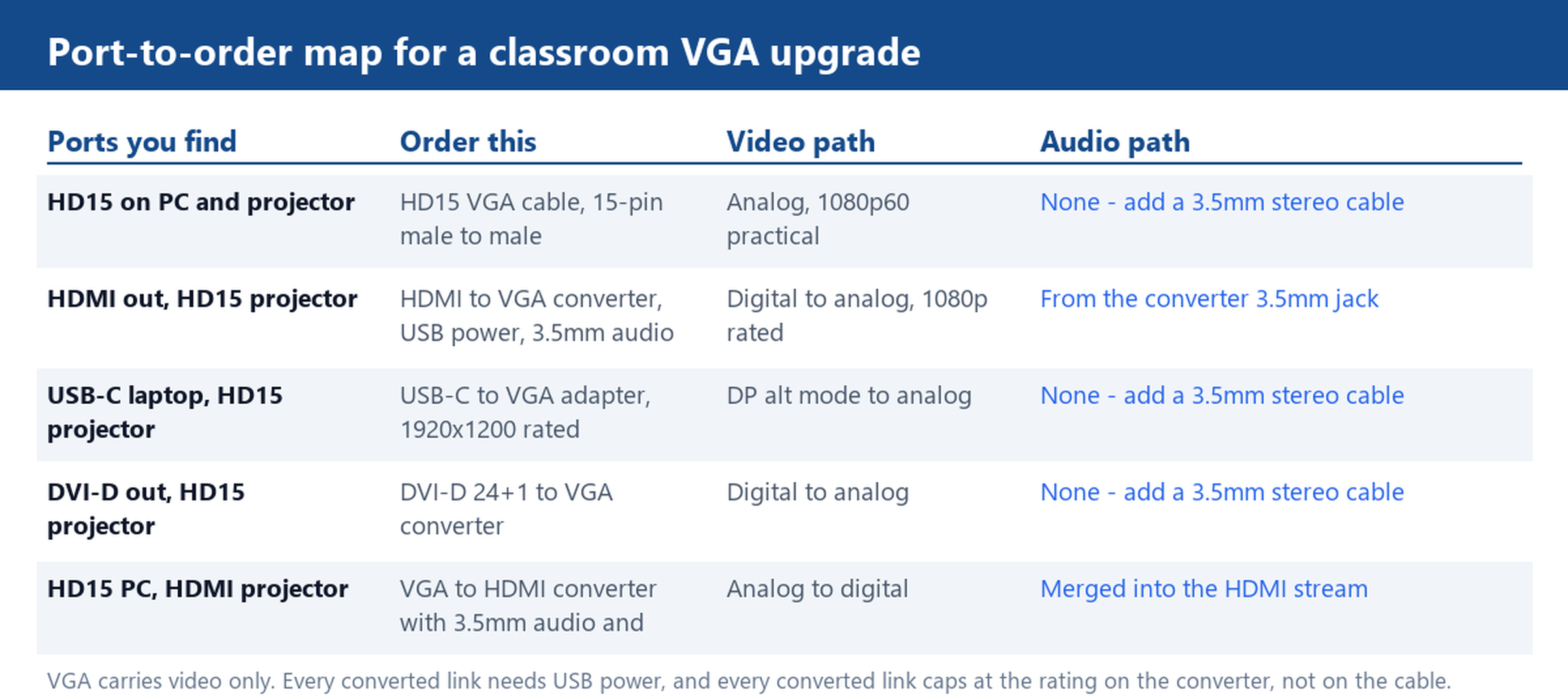
Before ordering anything, look at the two ends you need to join. If both the PC and the projector have a 15-pin female socket, the answer is a straight male-to-male cable: our HD15 VGA Cable, 15-Pin Male to Male and the Basic VGA Monitor Cable, HD15 Male to Male cover exactly this case, and they remain the low-cost, dependable backbone of the whole classroom kit.
If one end is digital, a passive pin adapter will not work, because HDMI, USB-C and DVI-D carry digital video while HD15 carries analog. The signal has to be converted by a chip, which means an active converter with its own power. The VGA range on our site splits that way too: the 1080P HDMI to VGA Converter Adapter, USB Power, Audio adds a USB power lead and a 3.5mm audio jack; the DVI-D 24+1 to VGA Converter Cable handles older desktop towers; and the USB-C to VGA Adapter Cable, 1920×1200, Aluminium serves the newer laptop fleet from a single Type-C plug. Each of those is a different chip doing a different job, so match the converter to the ports you actually photographed.
Where 1080p Comes From on a VGA Run
VGA itself has no fixed resolution. The display mode is negotiated between the source and the monitor, so asking whether VGA can do 1080p is the wrong question; ask what each device in the chain is rated for. On a straight HD15 run between a laptop and a classroom projector, 1920×1080 at 60 Hz is the practical ceiling, and most installed projector panels stop at that mode anyway.
On a converted link, the ceiling is printed on the converter, not on the cable. The HDMI to VGA converters in our catalogue are rated 1080p; the USB-C to VGA adapter is rated slightly above that at 1920×1200; and a separate HDMI to VGA Converter Cable, 1920×1200, No Audio demonstrates both facts at once, since some converter chips go past 1080p and some deliberately ship without an audio jack. Order by the rating printed for the converter, and treat any claim beyond it as a mismatch waiting to be discovered in front of a class.
Audio Is a Separate Cable: 3.5mm Jack, USB Power and Active Converters
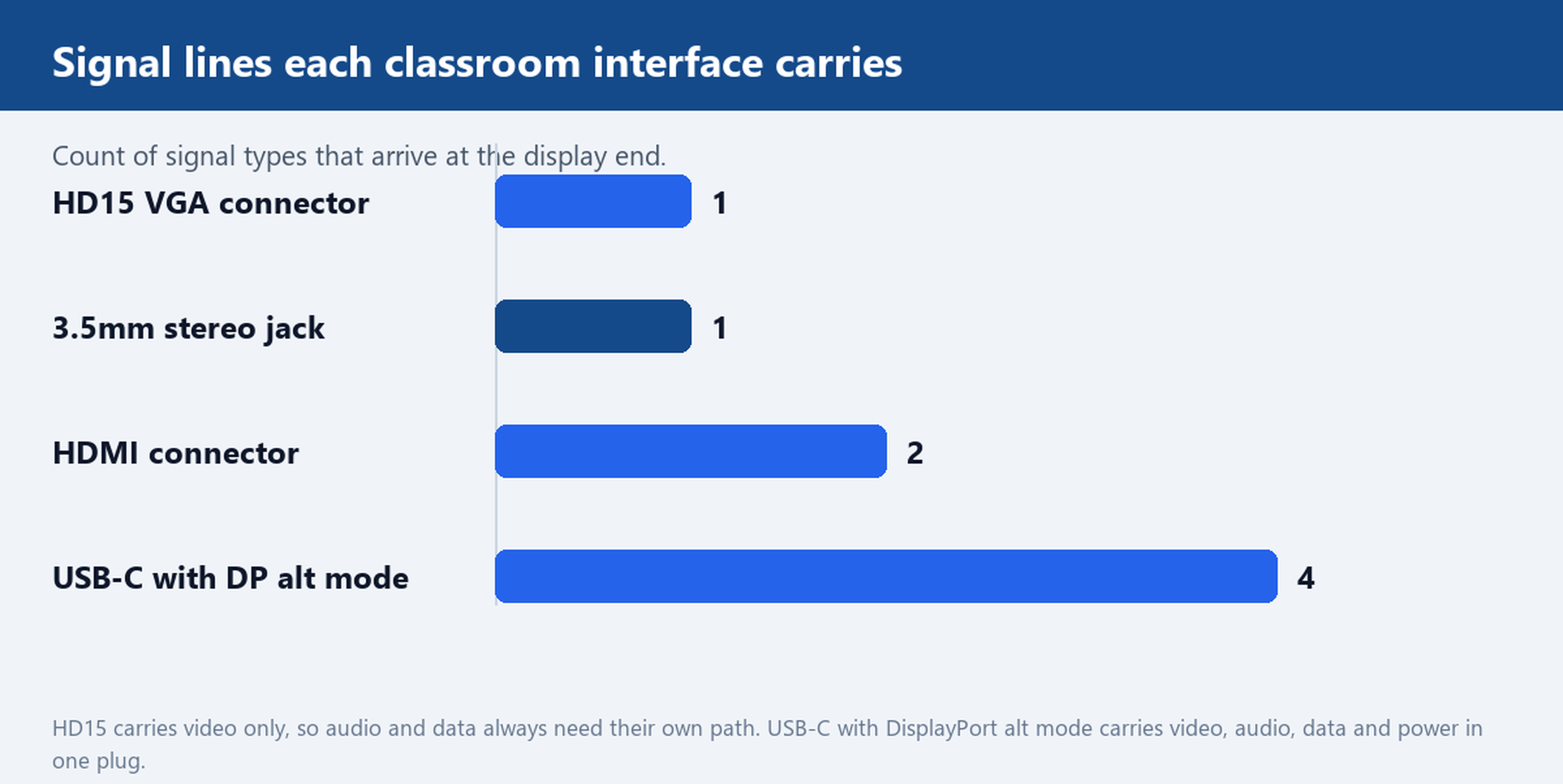
The HD15 connector uses all fifteen of its pins for video and handshake lines; none of them carries sound. That leaves three audio paths, and picking the right one is where classroom orders usually go wrong. Path one is a plain 3.5mm stereo cable from the PC headphone socket to the projector or to powered speakers. Path two is a converter with a built-in audio jack: on the 1080P HDMI to VGA Converter Adapter, audio from the HDMI stream leaves through the 3.5mm socket on the converter body. Path three is the reverse direction, where a VGA to HDMI converter takes analog video plus a 3.5mm audio feed and merges both into the HDMI stream for newer displays.
Every active converter also needs power, and in classrooms that almost always means a free USB port: the converters above draw from a standard 5V USB socket. When you inspect a room, count the free USB ports as carefully as you count the video ports. A converter without power is a dead converter, and a converter with nowhere to plug in is a return shipment, so this check costs nothing and saves an entire service round.
Choosing a VGA Cable for Classroom Walls: the List to Hand Over
Written down, a VGA cable for classroom retrofit usually adds up to five items. One shielded HD15 male-to-male cable for the fixed projector run, ordered at the route length rather than coiled behind the podium. One spare of the same cable, because a bent pin on the morning of an exam is a real event. One HDMI to VGA converter with USB power and a 3.5mm audio jack for visiting laptops. One USB-C to VGA adapter for the newer laptop fleet. One 3.5mm stereo cable for the rooms where audio lands on speakers instead of the projector. Bag them, label the pouch per room, and the install crew stops improvising on site.
For mixed fleets, odd route lengths or custom jacket colours, our Customize Cable page lists the options, and the Factory page shows the assembly lines behind them.
Photograph the projector, lectern and wall-plate ports in one sample room, send the photos over, and we will map each port to the right VGA or converter cable and quote the kit as one list. Start through our How to order page.